Introduction
In today’s business environment, improving operational efficiency and productivity is an urgent challenge. In particular, as organizations grow, many managers struggle with the speed of human resource development and effective management. In many companies, the valuable know-how and insights accumulated within teams are not documented, leading to repeated mistakes and business processes that depend entirely on individuals.
A "Playbook" is a powerful tool to solve these issues. HubSpot Playbooks provide tools to enhance sales capabilities and streamline sales activities and customer interactions, playing a crucial role in preventing "person-dependent" workflows. A playbook that systematically summarizes strategies and success stories can dramatically streamline business processes. Among various options, HubSpot's playbook tool is characterized by its intuitive interface, allowing anyone to create high-quality playbooks.
In this article, we will explain in detail everything from the basic concept of HubSpot Playbooks to specific pricing structures and actual usage methods. If you are considering introducing a playbook to optimize your business, please read until the end.
HubSpot's playbook function is a strategic tool for dramatically improving the operational efficiency of sales and customer support departments. By introducing this function, internal knowledge sharing becomes smooth, and a standardized and optimized business flow can be constructed. In this section, we will first delve into the concept of a playbook itself, and then focus on and explain in detail the unique strengths that HubSpot's Playbook possesses.
What is a Playbook?
A "Playbook" in business refers to a systematic set of guidelines for documenting valuable knowledge such as strategies, know-how, and success stories held by a company and sharing them throughout the entire organization. For example, in the field of cybersecurity, it may be utilized as an "Incident Response Playbook" that summarizes the response procedures when an incident occurs. In other words, it can be viewed as a code of conduct that specifically shows how to make decisions and act when faced with a particular situation or challenge. Although the concept is not yet widely popularized in Japan, in U.S. companies, playbooks are generally utilized as a standard tool for knowledge sharing and business promotion among team members.
A playbook aggregates lessons learned from past experiences, specific action plans for achieving goals, and recommended best practices, serving as a powerful guideline for the entire team to work with a consistent direction. As a result, the onboarding of new employees is accelerated, the knowledge level of the entire organization is improved, and it ultimately leads to an improvement in productivity.
What is HubSpot's Playbook?
The playbook function provided by HubSpot is a feature that allows for the easy creation of a wide variety of content to enhance the quality of sales activities and deepen engagement with customers, such as call scripts, competitive analysis data, and guides explaining the strengths of one's own products and services. This tool is particularly expected to be utilized in sales and customer service departments. By introducing HubSpot Playbooks, sales processes and customer response flows can be standardized, and business operations can be made significantly more efficient. Furthermore, it becomes a foundation for sharing the most effective methods and success experiences within the team and promoting the skill-up of the entire organization.
By making full use of HubSpot's playbooks, a company can realize flexible operations where each member can make the optimal decision according to the situation while maintaining consistent customer response as a company. This playbook tool can be displayed in coordination with various records in the CRM, such as contacts, companies, deals, and tickets. In the playbook, talk scripts, FAQs, competitive information, etc., can be created in a card format, and sales representatives can refer to scripts and sales materials by clicking and selecting them at the necessary timing using the latest materials. Also, email templates and snippets can be created, and personalized items such as company names can be inserted to realize efficient email communication. Furthermore, by creating materials and creating links, and then clicking to share and track them, the progress of sales activities and customer reactions can be grasped. Through this, during interactions with prospects or existing customers, team members can instantly refer to relevant guidelines and smoothly perform high-quality, standardized customer response.
Diverse Utilization Scenarios Brought by HubSpot Playbooks
HubSpot's playbook is a function that allows for the centralized management and sharing of diverse resources on the HubSpot platform that lead to improved results for sales departments and improved customer response quality. Here, we will delve into and explain the main usage methods of HubSpot Playbooks.
Utilization Scenarios in Sales Activities
HubSpot Playbooks powerfully back up the work of sales representatives. Sales representatives can easily access various content to strengthen sales strategies, such as detailed information on competitors, effective call scripts, and guides to highlight their company's superiority. For example, during an initial meeting with a prospect, by utilizing the script stored in the playbook, deep needs can be drawn out through effective questioning. Also, at the stage of comparison and consideration with competing products, they can refer to information about other companies and persuasively present the unique value of their own products and services. Furthermore, playbooks become an important foundation for new employees to systematically learn the specialized knowledge and success stories cultivated by experienced sales representatives in the company. By sharing the knowledge accumulated within the organization, new employees can smoothly blend into the existing sales team and realize skill improvement in a short period.
Utilization Scenarios in Customer Service
HubSpot Playbooks also demonstrate their true value in the field of customer support. They support various processes in customer touchpoints, such as follow-up after product purchase, support for the onboarding process, and troubleshooting. For example, they are useful when providing step-by-step guides so that new customers can smoothly start using the product, or when guiding them on how to deal with common problems. In this way, by the customer service team strategically utilizing HubSpot Playbooks, they will be able to solve the problems customers have quickly and accurately, and as a result, a dramatic improvement in customer satisfaction can be expected.
Key Features and Advantages of HubSpot Playbooks
HubSpot's playbook is an indispensable tool for improving the operational efficiency of sales and customer service and ensuring consistency of response. Sales representatives and customer service representatives can instantly pull out necessary information and maximize their respective business performance. Here, let's look in detail at the main features of HubSpot Playbooks and the advantages derived from them.
New Members Can Contribute Immediately
By introducing HubSpot Playbooks, it is possible to make newly joined members effective in a short period and have them play an active role quickly as a member of the team. In this playbook, indispensable knowledge for sales activities, such as detailed information about products, market trend analysis, and the best ways to approach customer response, is systematically summarized. New employees can efficiently acquire necessary skills and knowledge and put them to use in practice by proceeding with learning at their own pace. Also, since HubSpot Playbooks make access to necessary information easy at any time, they serve as a help to proceed with responses confidently and carefully while referring to information in the playbook even when faced with unexpected situations or challenges never experienced before.
A Foundation for Sharing Internal Specialized Knowledge and Experience
By utilizing HubSpot Playbooks, an environment can be constructed to effectively share valuable know-how and specialized knowledge accumulated within the organization. For example, it is possible to share insights obtained during meetings or communication with customers, and knowledge of success stories directly linked to results, with the entire team on HubSpot Playbooks. Other representatives can easily grasp important information such as product knowledge, the latest market information, and customer trends just by accessing the playbook, which can further enhance the quality of relationship building and communication with customers. Furthermore, since the playbook is always kept in the latest state, it prevents the risk of new members acting based on old information beforehand and supports business execution based on always accurate information.
Standardization of Sales and Customer Support That Does Not Depend on Individual Abilities
By introducing HubSpot Playbooks, sales activities and customer support processes, which tended to be influenced by the skills and experience of specific individuals, can be standardized. This realizes consistent, high-quality customer response as an entire organization without excessively depending on the abilities of individual representatives. Since specific sales strategies and customer service procedures are clearly stated in the playbook, even members who have newly joined the team can understand the flow of business in a short period and accurately grasp the points. Also, the standardization of processes through HubSpot Playbooks strengthens cooperation within the team and greatly improves business transparency. By having all team members follow common guidelines, the gap in recognition of how to proceed with business and expected results decreases, and more efficient information sharing and smooth business management are realized. As a result, the quality of customer response will improve, leading to an increase in the productivity of the entire team.
Streamlining Business Flows and Maximizing Productivity
Efficiency of business processes through HubSpot Playbooks contributes greatly to the productivity improvement of sales teams and customer service teams. At the sales site, through the utilization of playbooks, a wide variety of tasks such as dialogue with customers, lead progress management, and deal tracking can be executed more quickly and effectively. Furthermore, HubSpot Playbooks support sales representatives so that they can build relationships with customers more strategically by providing the best practices in each phase of the sales process. For example, specific approaches at each stage, such as selection criteria for prospects, effective proposal methods, and closing strategies, are clearly indicated by the playbook. On the other hand, in the customer service team as well, HubSpot Playbooks dramatically increase the efficiency of customer response. By preparing response flows for inquiries from customers, frequently asked questions (FAQs) about products and services, and guidelines for troubleshooting, customer service representatives realize rapid and consistent responses. Also, for similar inquiries received from customers, by preparing standardized answers and procedures in advance instead of taking time to respond individually, it becomes possible to significantly shorten the response time and lead to the resolution of more customer issues.
Pricing Plans for Which HubSpot Playbooks are Available
HubSpot's playbooks are provided in two products: "Sales Hub" and "Service Hub." And, the functional range of playbooks that can be used differs depending on the pricing plan you contract. In this section, let's look at the details of Sales Hub and Service Hub regarding the pricing plans that can maximize the use of HubSpot Playbooks.
Sales Hub
In Sales Hub, the playbook function is available in the Professional and Enterprise plans. In the Professional plan, you can utilize playbooks as a basic sales enablement tool to aim for the standardization and efficiency of sales processes. On the other hand, in the Enterprise plan, more advanced customization options and extensive integration functions are provided, so it is ideal for large-scale sales organizations or companies with complex sales cycles. Also, in the Enterprise plan, the optimization of sales strategies and performance improvement can be realized through detailed reporting functions and sophisticated sales automation functions.
Service Hub
In Service Hub as well, the playbook function can be used in the Professional and Enterprise plans. In the Professional plan, it is possible to standardize the main processes of customer service and improve the quality of customer response. In the Enterprise plan, more flexible customization functions and seamless integration options are prepared, making it suitable for large-scale customer service teams or companies with complex customer response flows. In the Enterprise plan, the operational efficiency and customer satisfaction of customer service can be maximized by utilizing detailed analysis tools and advanced customization functions.
Steps to Create a HubSpot Playbook
Up to this point, we have introduced the characteristics, advantages, and utilization examples of playbooks. However, when trying to actually create a playbook, many people may have questions such as "specifically how should I proceed." In such a situation, by utilizing HubSpot, it is possible to easily create a playbook. The creation of a playbook in HubSpot generally proceeds with the following steps. Next, we will explain the specific operation methods in each step in detail, so please use them as a reference.
Note: In order to use HubSpot's playbook function, a Sales Hub or Service Hub Professional/Enterprise account is required. Furthermore, when creating a playbook using HubSpot's AI content generation function, it is necessary to enable the AI assistant function in advance. Also, when recording a playbook to a record, that engagement is recorded only to the specific record where the playbook was used. Please note that it is not automatically recorded to other associated records.
<Creation Procedure>
1. Selection of Template
When creating a new playbook in HubSpot, two main approaches exist. In this section, we will explain the procedure for creating a HubSpot playbook utilizing a template. In HubSpot, a wide variety of templates such as "Sales Playbook" and "Service Playbook" are provided, and you can proceed with customization freely based on these. When creating a playbook for the first time, by choosing a template that matches the purpose and utilization scenario, you will be able to efficiently grasp its basic structure and further add unique question items effectively, so active utilization is recommended. Below are the playbooks prepared in HubSpot, but it is also possible to customize them yourself.
Template List:
- Discovery Call Playbook: A playbook for communication with prospects.
- Qualification Playbook: A playbook for checking budgets, etc.
- Business Review Playbook: Regular business confirmation. Building relationships with customers.
- Customer Success Onboarding Playbook: A playbook for implementation support.
2. Adding Headings and Introductory Text
As the next step, incorporate headings and introductory text into the HubSpot playbook you are creating. In this part, it is good to concisely fill in the overall purpose of the playbook and how to use it. Headings clarify the divisions between sections, and introductory text serves the role of summarizing the contents of that section. Regarding text content, in addition to changing font types, sizes, and colors, decoration settings such as underlining and bolding can be flexibly performed. Also, not only text information but also diverse media elements such as images, videos, and related links can be added. Let's configure the content while always being conscious of visual clarity and information organization so that users can understand the content smoothly.
3. Adding Question Items
When adding questions to the playbook, use the dedicated insertion link function. The question format is registered in a descriptive type, and the answer format for it can be selected from the following three types according to the situation.
<Answer Type List>
- Text area: Records answers as text.
- Answer options: Selects from pre-prepared options.
- Update property: Automatically updates HubSpot properties based on the answer.
In cases where specific answers are expected in advance, by setting "Answer options," users will be able to input answers smoothly in a dialogue format. Furthermore, if you set the answer to a question as a "Required" item, answering the relevant question becomes mandatory when a user inputs or updates the content of the '[hubspot playbook]'.
4. Setting Automatic Property Updates
If you choose the "Update property" option as the answer type, the answer to the question from the user is automatically registered to the corresponding record. To use this function, first select the record type you want to associate from among "Company," "Contact," "Deal," and "Ticket." Next, by setting the property you actually want to update, the answer data of the question obtained within the '[hubspot playbook]' will be efficiently and automatically reflected in the corresponding record.
5. Setting Engagement Type and Timing
Continuing, to adjust the playbook in even more detail, move to the "Settings" tab and define the type of engagement and its recording timing. Here, you can specifically specify what form of interaction with the customer the playbook should record and when that record should be performed. Engagement type refers to the target for which the playbook captures activities, and you can freely combine them from options such as calls, meetings, emails, and notes according to your purpose.
6. Publishing the Playbook
When all the preparations for the playbook are complete, simply click the "Publish" button in the upper right of the screen to finish. From the list screen, you can check in advance how the created playbook will be displayed. The published playbook becomes practical guidelines for the sales or customer service team to make the interaction process with customers efficient and consistent. This can be expected to improve the performance of the entire team.
Management and Organization of Playbooks
Creating a playbook is only the first step. To maximize its value, continuous and efficient management and organization are extremely important. HubSpot's playbook function is equipped with a convenient feature that allows you to manage created playbooks by dividing them into folders by purpose. Through this organization technique, even if the number of playbooks becomes enormous, it becomes possible to quickly search for and access necessary information. For example, by constructing folders by sales phase or by product category, team members will be able to find and utilize necessary guidelines more intuitively.
How to Utilize Playbooks in HubSpot CRM Records
Created playbooks are practically utilized in various records within HubSpot CRM, promoting a dramatic efficiency of sales activities and customer service business. Specifically, we will delve into how playbooks function in a wide variety of record types such as contacts, companies, deals, tickets, and even custom CRM records, and their specific utilization methods.
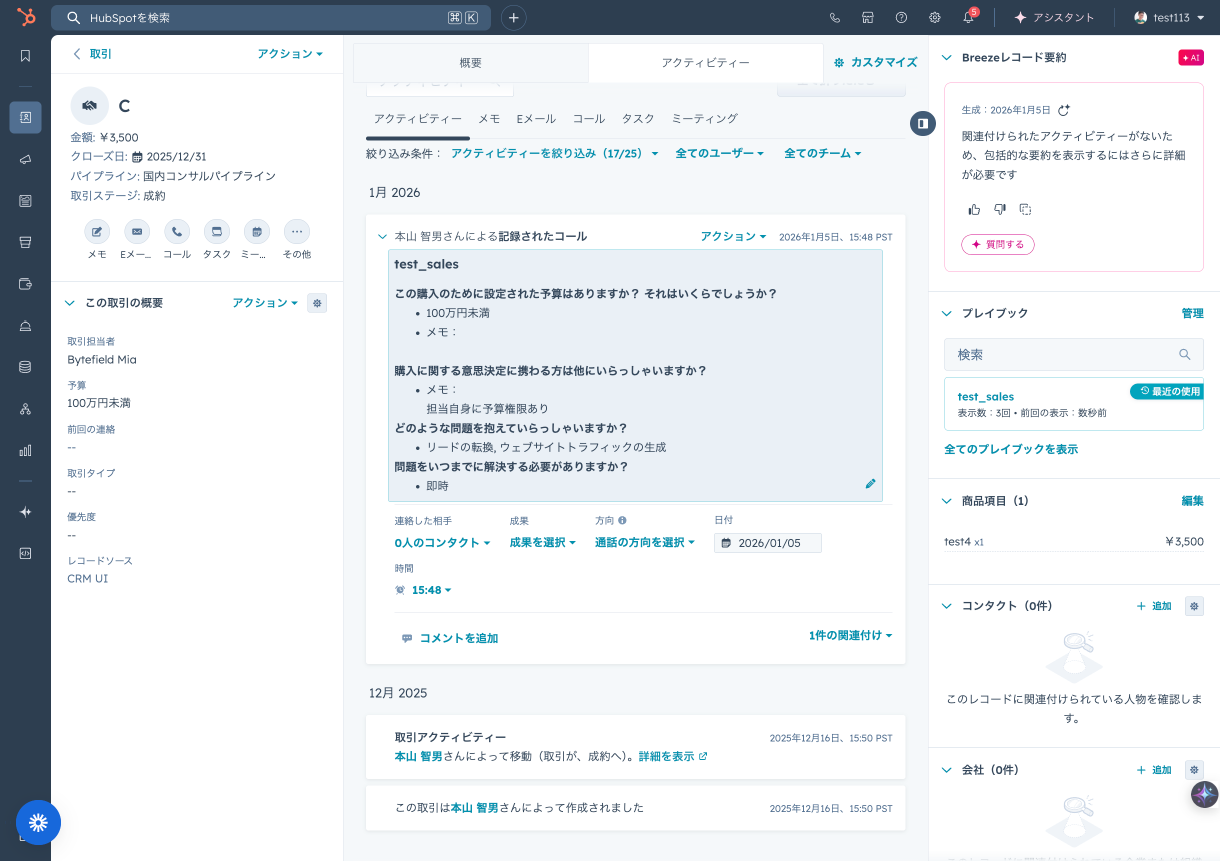
Displaying and Using Playbooks on Records
On the timeline of each customer record, interactions in the HubSpot playbook are saved as records along with questions, answers, and related notes. The input content to the playbook is automatically held as a draft until the final "Log engagement type" button is pressed, making it easy to interrupt and resume work. Once the interaction is recorded, all relevant properties are automatically kept in the latest state on the CRM record based on the answers selected or input within the playbook. This function can be used in the Professional or Enterprise plans of Sales Hub and Service Hub, reducing the burden of manual data entry and significantly increasing the accuracy of CRM data. Through the seamless coordination between HubSpot playbooks and CRM records, sales teams and customer service teams can effectively manage customer interaction history and plan the next strategic actions based on that information.
Creating Recommended Playbook CRM Cards
Particularly important HubSpot playbooks or those frequently required in specific scenarios can be fixed and displayed as "Recommended Playbook CRM Cards" at the top of each record. This is a function that a Super Admin can set, and when a team member opens a specific customer record, the playbook most suitable for that situation will be automatically presented. For example, in a deal record at a specific deal phase, a sales playbook specialized for that phase will be displayed as a card, and the representative can obtain appropriate advice on the spot. As a result, consistency is born in the operations of the entire team, the risk of overlooking important processes or information is reduced, and overall business efficiency is significantly improved.
Playbook Effectiveness Measurement and Integration Functions
HubSpot playbooks do not just stop at creation and utilization; their value can be maximized by evaluating their results and coordinating them with other tools. Here, we will detail the methods for analyzing the utilization status and effectiveness of playbooks, as well as the coordination options with HubSpot's powerful functional groups such as Slack and workflows.
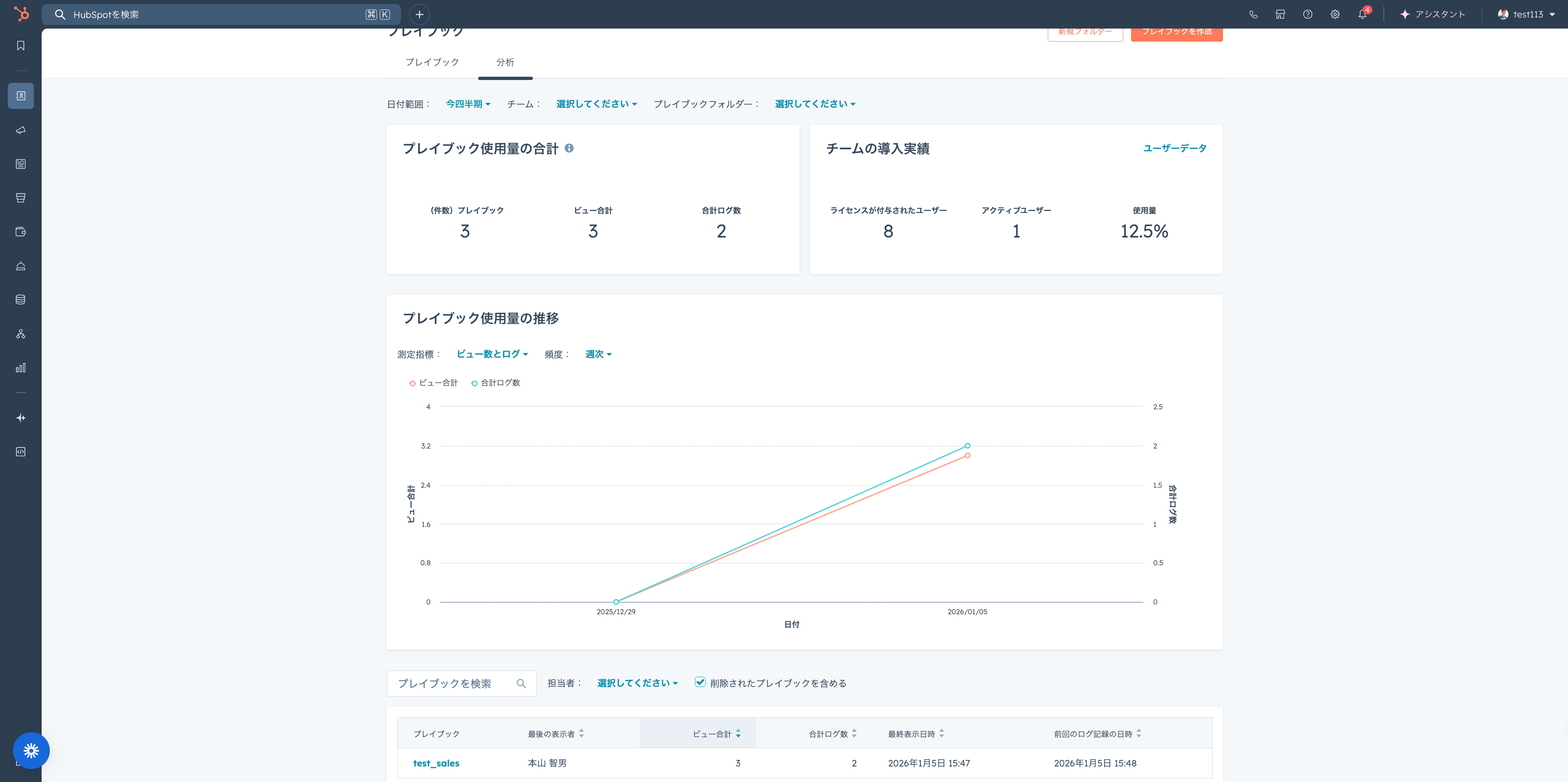
Playbook Reporting and Analytics Display
To maximize the introduction effect of HubSpot playbooks, it is essential to continuously monitor and understand their utilization status and performance. HubSpot provides a dedicated reporting and analytics function for playbooks, making it possible to visually grasp detailed data such as which playbooks are being utilized how much, who the users are, and what kind of impact they are having on the business. Through this, you can identify playbooks that are frequently utilized or playbooks that are contributing to specific sales results, and deeply analyze the factors that are the key to their success. On the other hand, for playbooks with low utilization rates or that are not demonstrating the expected effects, valuable insights can be obtained to take measures for re-evaluation of content or improvement. By strategically utilizing these reports, you can always optimize the operation of playbooks and contribute greatly to the productivity improvement of the entire team and the achievement of corporate goals.
Searching and Viewing Playbooks from Slack
HubSpot playbooks and Slack, which is indispensable for modern business communication, can be smoothly coordinated. In organizations that have integrated HubSpot and Slack, by using the /hs-search-playbook command, you can search for playbooks directly from within a Slack channel and have their content displayed instantly. Through this function, team members can quickly access necessary playbook information without the trouble of opening another application. For example, in response to an urgent question from a customer, you can search for a playbook for a relevant solution on Slack and quickly identify the response policy. This coordination increases the speed of access to information and strengthens cooperation between teams, as a result contributing greatly to the acceleration of customer response and the improvement of service quality.
Integration of Playbooks and Workflows
By combining playbooks with workflows, which are powerful automation tools provided by HubSpot, automatic execution of tasks and updating of information become possible triggered by specific events. When recording the execution of a playbook, a specific workflow can be set as the activation condition. For example, automation scenarios such as "When a specific playbook is completed, automatically create the next follow-up task" or "Send a notification to the customer success team when a customer has finished the procedures of a specific problem-solving playbook" can be realized. This coordination reduces the burden of manual work and further streamlines sales and customer service processes. By coordinating with workflows, the playbook does not stop at being a mere instruction manual but functions as a powerful automation engine, dramatically improving the team's productivity and business efficiency.
Summary
In this article, we have explained HubSpot's playbooks from multiple angles, from basic concepts to functions, advantages, utilization strategies, creation procedures, utilization in CRM records, effectiveness measurement, and coordination with other tools. By introducing playbooks, business processes that tend to depend on individuals are standardized, contributing to the productivity improvement of the entire organization. Also, playbooks are very effective as onboarding tools for new employees, and contribution to sales as an effective force in a short period can be expected. Particularly, HubSpot's playbook function has a great appeal in its intuitive operability, from the selection of diverse templates to the addition of questions and the definition of engagement types. Since playbooks once published can be easily edited, added to, or stopped afterwards, sales departments and customer service departments will be able to realize deeper relationship building with customers and performance improvement of the entire organization. Furthermore, advanced functions such as recommended playbook display on CRM cards, visualization of results through reporting functions, simplification of information access through Slack coordination, and automation through workflow coordination sublimate the playbook into an important asset for accelerating business growth beyond mere guidance. If you are interested in HubSpot's playbook function, please consider its utilization.
FAQ
What kind of thing is HubSpot's Playbook?HubSpot's playbook is a digital guide that aggregates strategies and knowledge for sales and customer service teams to communicate effectively with customers. The purpose is to maintain consistency in business processes and increase efficiency by centrally managing and sharing phone scripts, comparison information with competing products, and positioning guides for one's own products on the HubSpot platform throughout the team.
For what purposes is HubSpot's Playbook used?HubSpot's playbook is utilized for a wide variety of purposes, such as the rapid start-up of new employees, promoting the sharing of knowledge and best practices within the organization, unifying procedures in sales and customer service that tend to be person-dependent, and improving productivity through the optimization of business processes. Through this, the team provides an unwavering, high-quality customer experience and powerfully backs up business development.
In which pricing plans can HubSpot's Playbook be used?HubSpot's playbook function can be accessed in the Professional plan and Enterprise plan of "Sales Hub" and "Service Hub." This function is not included in the Free plan or Starter plan.
Please tell me the main steps when creating a playbook in HubSpot.The main process in creating a playbook in HubSpot consists of the following steps. First, choose a template that matches your purpose. Next, insert a title and introductory text explaining the intent and usage of the playbook. After that, provide question items and apply the answer format and automatic property update settings accordingly. As the final stage, set the type of engagement and display timing, and publish the playbook. If necessary, it is also possible to generate content utilizing the AI assistant function.
How are playbooks utilized in HubSpot's CRM records?On HubSpot CRM records, playbooks are utilized in a wide variety of entities including contacts, companies, deals, support tickets, and custom CRM records. These are recorded as interactions in the timeline of the record and are held along with the question content, answers, and related notes. Input data is automatically saved, and by enabling the "Log engagement type" option, it can also be configured so that CRM properties are automatically updated. Furthermore, a Super Admin can provide "Recommended Playbook CRM Cards" and present highly relevant playbooks at the top of the record.
What kind of information can be confirmed with the playbook reporting function?HubSpot's playbook reporting function provides detailed analysis data regarding how much each playbook is being utilized, specifically who is utilizing it, and what kind of impact it is having on the business. This information is essential for accurately grasping the current utilization status of playbooks and building higher content quality and more effective strategies.
Can HubSpot Playbooks coordinate with Slack?Yes, HubSpot Playbooks support coordination with Slack. When the integration of HubSpot and Slack is set up, by using the "/hs-search-playbook" slash command within a Slack channel, it is possible to directly search for necessary playbooks and display their content. Through this coordination, access to information is accelerated, and collaboration between teams is dramatically improved.
Is it possible to automate workflows using playbooks?Yes, HubSpot's playbooks can coordinate with the workflow function and become triggers for automation. When a playbook is recorded in the system, it is possible to set it to automatically start a specific workflow set in advance. For example, business efficiency can be improved in a form such as the next follow-up task being automatically created upon the signal of completion of a specific playbook, or necessary notifications being sent to the team in charge.