Introduction
n modern business, building strong relationships with customers and maximizing their satisfaction is the cornerstone of sustainable corporate growth. Customers form a comprehensive experience not only through the product or service itself but through every interaction they have with a company. Since the quality of this customer experience directly links to securing repeat business and fostering brand loyalty, optimizing customer support can be considered an essential element of business strategy.
HubSpot's "Service Hub" is an integrated platform developed to streamline customer service and improve its quality. This article provides a detailed explanation of Service Hub's primary features, the specific benefits companies can enjoy through its implementation, and key points to keep in mind when considering adoption. Furthermore, we will delve into the pricing structure of Service Hub and introduce how it can realize higher customer satisfaction and support efficiency through concrete examples. In particular, we will focus on how to utilize the [HubSpot Customer Portal], which allows customers to manage their own inquiry status and encourages self-resolution.
HubSpot is a cloud-based integrated platform centered around CRM (Customer Relationship Management). This platform is designed to support the holistic growth of a business by seamlessly linking key business areas such as marketing, sales, customer service, and website operations. Founded in the United States in 2006, HubSpot has since expanded its services worldwide. As of August 2025, it is utilized by over 268,000 companies in more than 135 countries.
HubSpot's CRM centralizes and manages customer data, allowing for a detailed understanding of interaction histories and behavior patterns across all customer touchpoints, enabling an approach optimized for each individual customer. This integrated data foundation supports powerful collaboration between HubSpot's various hubs (Marketing Hub, Sales Hub, Service Hub, etc.), breaking down departmental silos and providing strong support for the execution of customer-centric business strategies.
What is Service Hub?
Service Hub is the solution within HubSpot's product suite specifically designed for customer service. It features a wealth of functions that not only deepen engagement with customers but also dramatically improve the efficiency of support operations themselves. The primary goal of this hub is to enhance the overall quality of the customer experience by resolving customer questions and issues quickly and effectively.
By implementing Service Hub, companies can centrally manage diverse inquiries from customers and provide consistent, high-quality support through team collaboration. For instance, a wide range of features is available, including the [HubSpot Customer Portal] where customers can check information themselves, a robust knowledge base, an efficient ticket management system, and real-time web chat. By leveraging these, customer service teams can achieve smoother and more proactive responses, ultimately contributing to improved customer loyalty.
11 Key Features of Service Hub
HubSpot Service Hub offers an extremely wide variety of features to simultaneously achieve improved customer satisfaction and the accompanying efficiency of support operations. Here, we will delve deep into 11 major features of Service Hub, providing detailed descriptions of each and the specific benefits obtained by utilizing them.
HubSpot Customer Portal: Visualization of Support Status
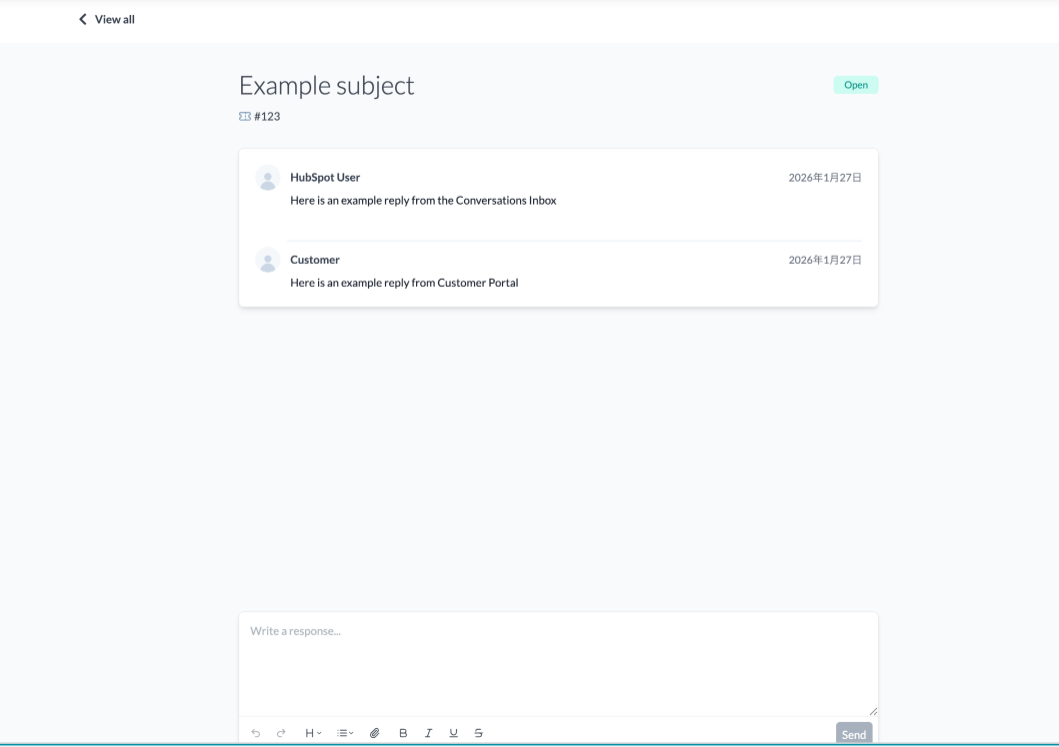
The HubSpot Customer Portal feature is a core function for providing transparency to customers regarding their support status. Through this portal, customers can track the real-time progress of inquiries they have submitted (so-called "tickets") and easily create new support requests. This increases the transparency of the support process and leads to building trust in the company. Since customers can immediately confirm what stage their problem is currently in, they can wait for a resolution with peace of mind.
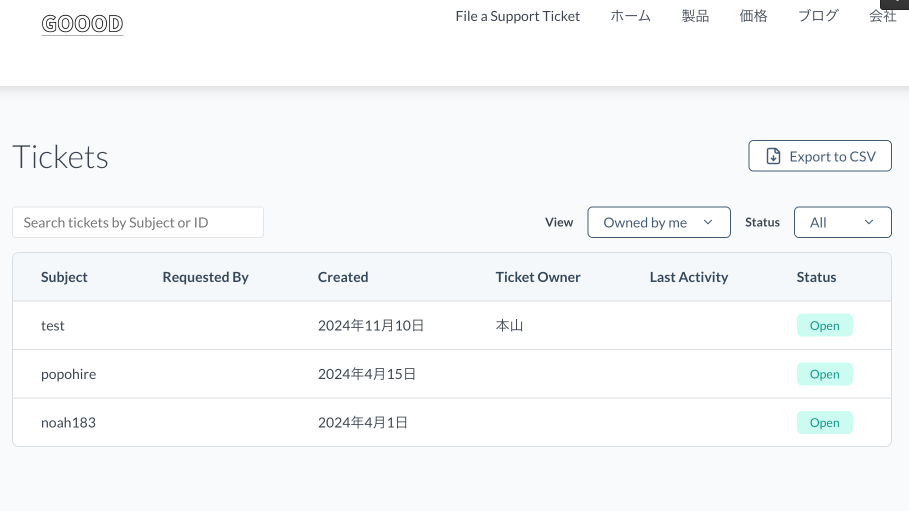
Furthermore, by linking with the knowledge base described later, customers can easily access information such as troubleshooting and FAQs to promote self-resolution. Additionally, this HubSpot Customer Portal integrates with HubSpot CRM and the shared inbox feature, so all communication history with the customer is centrally recorded within HubSpot. This allows for comprehensive management of interactions between representatives and customers. The customer portal can be easily set up without coding and can be customized with designs, brand colors, and logos to provide a consistent brand experience to the customer.
Overview and Benefits of HubSpot Customer PortalThe HubSpot Customer Portal is a dedicated online platform where customers can securely log in to check, issue, and reply to support tickets. Customers can access this portal through the knowledge base or a directly shared link. This feature is built to allow customers to efficiently manage multiple support requests and visually grasp the status of each.
When a customer inquiry is turned into a ticket via the customer portal, it automatically appears in the linked shared inbox. This allows the support team to quickly grasp the customer's current situation and begin a prompt response. Because customers can confirm that their inquiry has been successfully received and that progress is being made, it not only provides a sense of security but also leads to a reduction in the number of inquiries via phone or email.
Target Plans and Background of Use for HubSpot Customer PortalThe Customer Portal feature of HubSpot Service Hub is available to users on the Professional plan or higher. Originally offered as a beta version, it was implemented as a formal live feature in response to overwhelming user demand. Notably, it gathered 454 "upvotes" on the HubSpot Ideas Forum, demonstrating that many companies strongly desired this feature to strengthen customer engagement and improve support operations efficiency.By introducing the HubSpot Customer Portal, companies allow customers to refer to their past inquiry history and current status at any time, significantly improving support transparency. This is an extremely effective means of reducing customer anxiety and building trust in the company, especially in situations requiring complex problem-solving or long-term support.
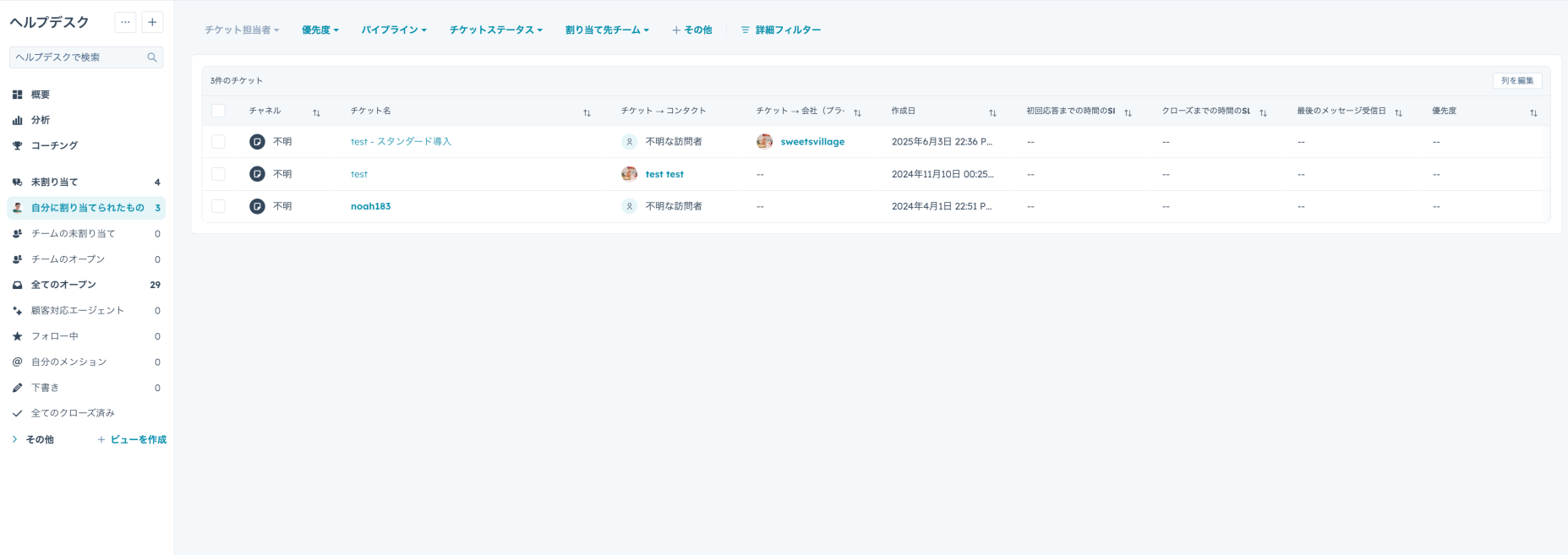
Setup and Management of HubSpot Customer PortalTo maximize the use of the HubSpot Customer Portal, proper setup and ongoing operational management are essential. For portal setup tasks, a user account with "Customer Portal Settings Permissions" is required. The person with this permission is responsible for the construction and maintenance of the portal. Before starting, it is recommended to confirm several basic requirements, such as whether the registration email address is correctly linked to contact information.
Prerequisites for SetupThere are several important considerations before deploying a customer portal. First, it is essential to optimize the relevant email templates and system settings so that the process from customer registration to login proceeds smoothly. In addition, it is necessary to ensure that each customer using the portal is accurately linked to the corresponding contact record within the CRM to maintain data consistency. This accurate linkage allows customers to grasp their precise ticket history and enables the provision of a support experience tailored to individual needs.
What Can Be Done with Settings ManagementEven after the introduction of the customer portal, administrators can flexibly adjust a wide range of settings. For example, it is possible to change the portal domain to match the company's brand or customize the ticket display format to be more intuitive and easier for customers to understand. Furthermore, by managing consent notification settings, companies can ensure compliance with data privacy regulations such as GDPR and strengthen the protection of customers' personal information. Additionally, adding a support-specific form to the portal allows customers to easily make specific types of inquiries, contributing to further efficiency in the support process.
Knowledge Base: Promoting Self-Resolution of Issues
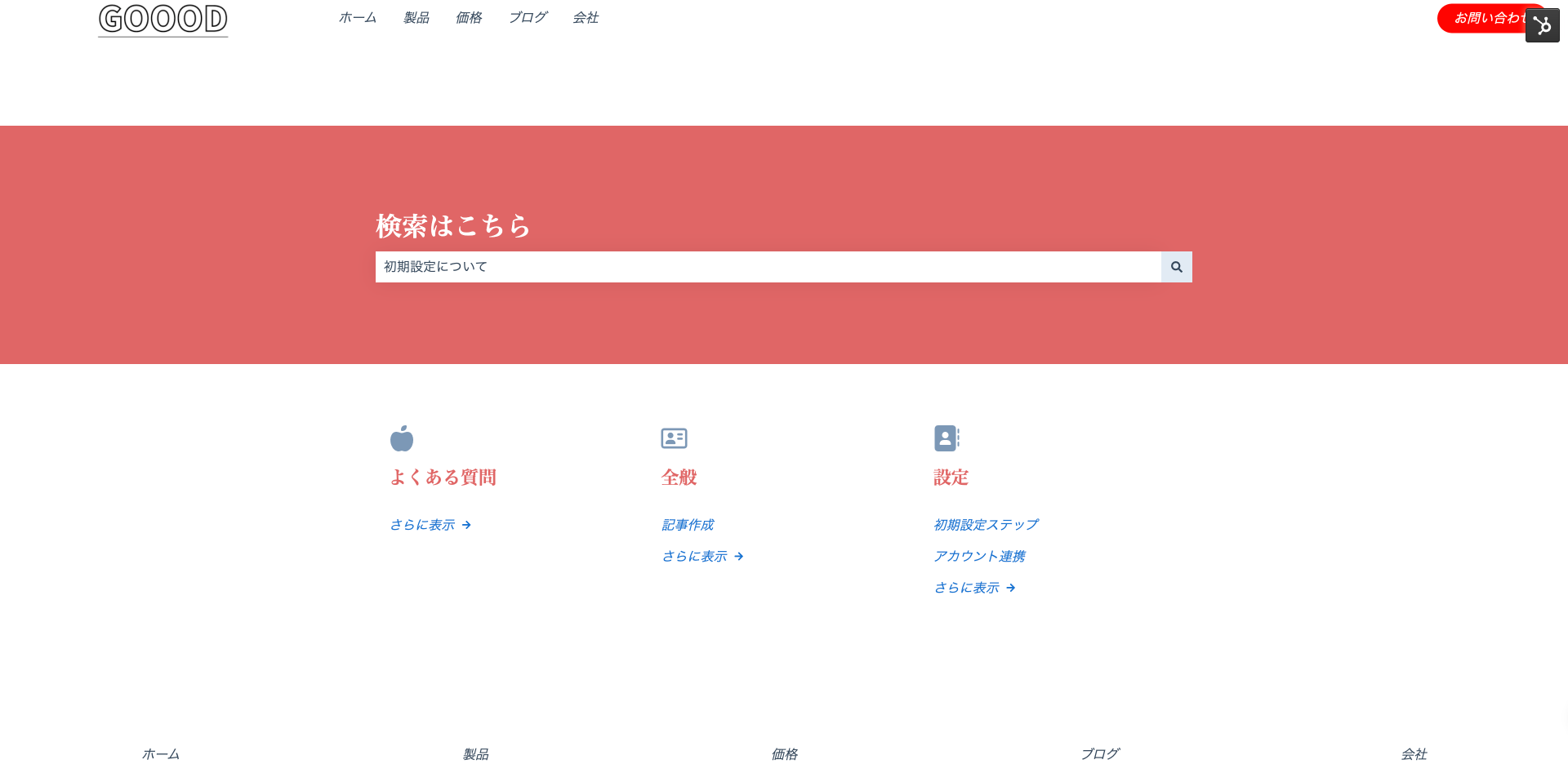
The Knowledge Base feature is for building an online information hub designed so that customers can solve problems themselves. By utilizing this feature, you can create a wealth of frequently asked questions (FAQs), detailed help guides, operation manuals, and troubleshooting articles regarding products and services, strongly supporting autonomous problem-solving by customers.For example, by publishing a guide on the portal that covers frequently asked questions, customers can easily search for necessary information, reducing direct inquiries to support. Additionally, since the knowledge base is accessible 24 hours a day, customers can work on solving their problems even outside of business hours, which directly links to a qualitative improvement in the customer experience. As a result, the dual benefits of improved customer satisfaction and a reduced workload for the customer service team are realized.
Web Chat: Improving Satisfaction through Immediate Response
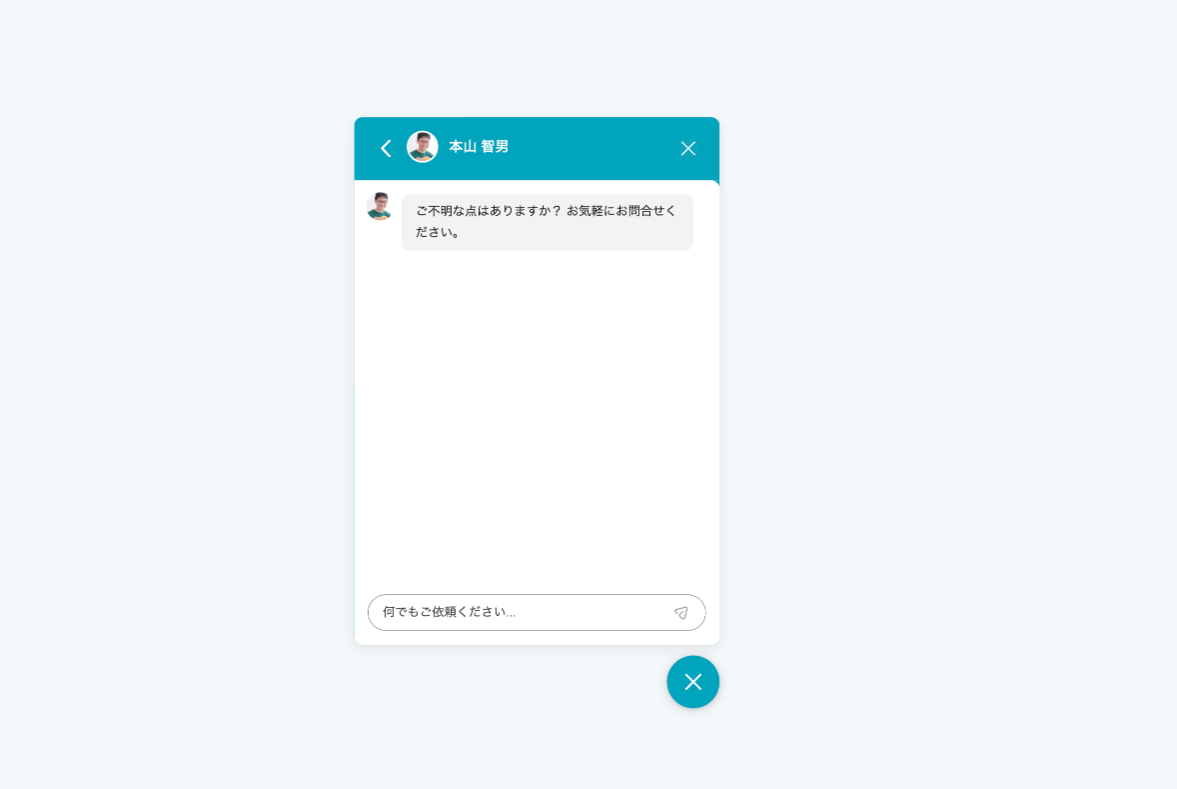
The Web Chat feature is a tool for real-time communication with customers, proving its true value especially in situations where a quick response is required. For example, by immediately answering questions about products or issues regarding orders during online shopping, customers can resolve their anxieties on the spot, leading to deeper trust in the company and the products or services provided.Furthermore, by utilizing chatbot functions, 24-hour response becomes possible, and automated answers can be provided for common inquiries. This allows for responding to customer questions even outside the support team's business hours, ensuring customers can get the information they need at any time. Providing rapid real-time support through web chat in this way is very effective for improving customer satisfaction and building long-term customer loyalty.
Inquiry Management: Realizing Efficient Problem Solving
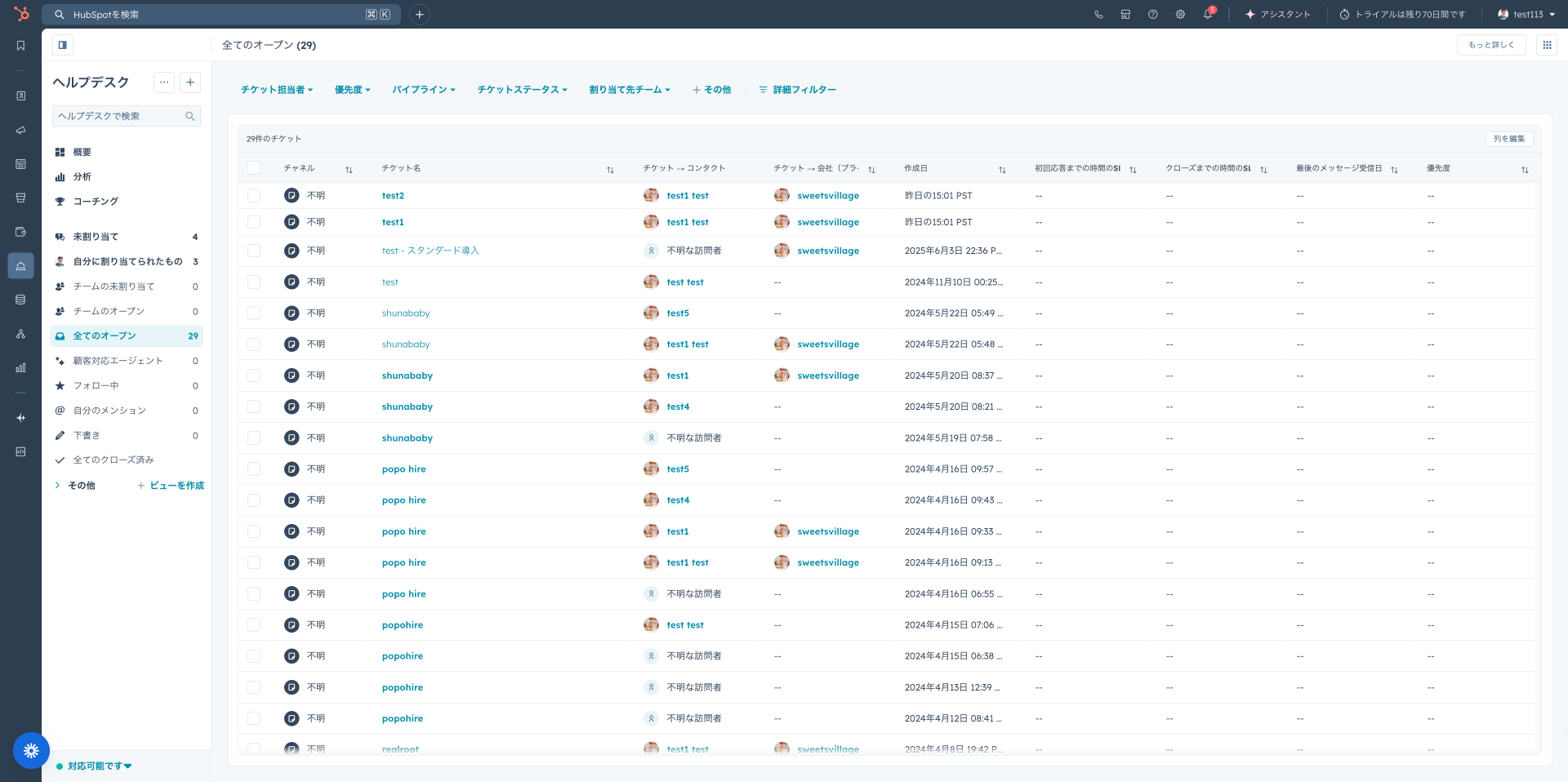
The Inquiry Management feature is a system for systematically organizing customer requests and issues and centrally grasping their progress. While the previously mentioned "HubSpot Customer Portal" serves as the window for customers to check progress themselves, this inquiry management feature is utilized by the customer service team to manage the status internally and grasp the overall picture.For example, when questions are received from multiple customers simultaneously, assigning a unique ticket to each allows for the clarification of priorities. Furthermore, it is possible to immediately and visually grasp the current status of each inquiry (e.g., in progress, unaddressed) and which representative is handling it. This feature contributes to preventing response omissions or delays and minimizing customer dissatisfaction. Since the history of inquiry responses is also saved, past cases can be quickly referenced, improving the speed of problem-solving. It is an indispensable feature for aiming at efficient issue resolution and improved customer satisfaction.
Shared Inbox: Strengthening Team Collaboration for Rapid Response
The Shared Inbox feature is a tool that allows multiple team members to view customer communication history simultaneously and collaborate for a rapid response. Through this feature, messages from customers arriving from diverse channels such as email, chat, and social media can be aggregated and managed in one place.For example, by having the customer service team and sales team share past interactions and current response status for the same customer in real-time, it becomes possible to immediately grasp the history of the inquiry and who should respond next. By utilizing this feature, even if a specific team member is absent, other members can smoothly take over the work, ensuring customers are not kept waiting for a long time. As a result, the cooperation system of the entire team is strengthened, and the speed and quality of customer response are significantly improved.
Playbooks: Standardizing Customer Response Quality
The Playbooks feature is a tool for building guidelines to unify the customer response quality of the entire team at a high level. This feature demonstrates its maximum value particularly for companies with many support representatives or when the nature of the product or service is complex.Specifically, by describing step-by-step procedures for answering common product questions or solutions for specific troubles in detail, even inexperienced staff can respond with the same quality as a veteran. By utilizing this feature, all staff can solve problems following a common process, preventing variations in customer response quality and allowing for the expectation of a stable customer experience and improved satisfaction. Furthermore, by continuously updating and improving the content of playbooks, it is possible to continue providing support based on the latest information.
Omnichannel Customer Service: A Consistent High-Quality Customer Experience
Omnichannel Customer Service is an integrated approach to realize consistent, high-quality service provision regardless of which touchpoint a customer uses for an inquiry, such as email, phone, chat, or social media. HubSpot Service Hub efficiently centralizes customer interactions from these diverse channels to create a seamless, uninterrupted customer experience.For example, even if a customer wants to reconfirm details via email later regarding an inquiry they made over the phone, the support team can instantly refer to the past history and continue the response smoothly without interruption because all communication history across channels is integrated into the HubSpot platform. From the customer's perspective, they can receive the same level of support regardless of the channel they use; from the support team's perspective, the effort of repeating the same explanation multiple times is saved because information is aggregated in one place. This reduces the burden on both the customer and the support team, enabling a more comfortable and efficient service experience.
Customer Feedback Collection: Insights for Improvement
The Customer Feedback Collection feature is extremely important for listening directly to the voice of the user and clarifying areas for improvement in service delivery. By utilizing this tool, companies can obtain information based on the real experiences of customers and link it to specific improvements in products, services, and support systems.For example, by regularly soliciting surveys regarding the usability of services and products or satisfaction with support responses, it becomes clear which areas should be addressed. Surveys can be deployed in various formats such as NPS (Net Promoter Score), CSAT (Customer Satisfaction Score), and CES (Customer Effort Score). Collected feedback is automatically aggregated on a management screen (e.g., the dashboard of the [HubSpot Customer Portal]), so it can be utilized for new feature development or optimization of response processes based on analysis results, individual requests, and complaints. As customers' opinions take shape, they will further deepen their trust and loyalty to the company.
Service Level Agreement (SLA) Management: Maintaining Promised Standards
The Service Level Agreement (SLA) Management feature is a system for tracking and supervising the achievement of service levels agreed upon with customers. This serves as an indispensable means of guaranteeing the quality and rapid response of the services provided by the company.Specifically, it is possible to make promises with customers, such as "problems will be resolved within X hours," and share the progress status. To fulfill this promise, the company can prioritize all inquiries (tickets) and grasp the response status in real-time. Customers are freed from uncertainties such as "when will I get a reply" or "how long will it take," fostering a sense of security and trust. SLA management appropriately manages customer expectations and simultaneously contributes significantly to improving the operational efficiency of the support team.
Customer Support Analytics: Performance Evaluation
The Customer Support Analytics feature is a tool for digging deep into the effectiveness of support operations based on data and clarifying which responses yielded the best results. Through this feature, the activities of the support team are clearly visualized as numbers, enabling the formulation of improvement measures based on objective data.Specifically, the entire team is evaluated using key performance indicators such as average time to resolution, time to first response, customer satisfaction scores, and ticket reopen rates. Based on these analysis results, areas for improvement in the process can be identified, pursuing faster response speeds and even higher levels of customer satisfaction. Furthermore, by analyzing inquiry trends related to specific products or services, it can lead to improvements in the products themselves and the formulation of more accurate information delivery strategies for customers.
Corporate Value Brought by Implementing HubSpot Service Hub
We have introduced the primary features of HubSpot Service Hub, but what are the specific benefits companies can enjoy by actually implementing it? Service Hub is not just a customer support tool; it can become a strategic foundation that powerfully drives the growth of the entire company.
Significant Improvement in Customer Satisfaction
By implementing Service Hub, companies can expand touchpoints with customers from multiple angles, realize high-quality communication, and consequently expect to dramatically increase customer satisfaction. In particular, providing the HubSpot Customer Portal and a robust knowledge base where customers can resolve questions at their own pace encourages customers to solve problems online before contacting the support desk, reducing customer stress caused by wait times or response delays.Furthermore, by making full use of web chat and integrated omnichannel support, it becomes possible for customers to communicate through the channels they are most accustomed to, providing a more personalized and convenient support experience. This fosters a deep sense of security and trust in the company, ultimately leading to improved customer loyalty. This will significantly increase the possibility of acquiring repeat customers and new customers through positive word-of-mouth.
Dramatic Efficiency in Support Operations
By utilizing HubSpot Service Hub, it is possible to significantly streamline the work processes of the support team. With the powerful ticket management feature, the progress and priority of inquiries (tickets) from each customer are managed centrally. This allows representatives to grasp all tickets in real-time and efficiently assign responders across the team, preventing response omissions or delays and improving the response efficiency of the team as a whole.In addition, by aggregating and publishing frequently asked questions (FAQs) and troubleshooting guides in a knowledge base, the number of routine inquiries is reduced, allowing the support team to focus on more complex and individual problem-solving. This not only reduces the workload of the support team but also contributes to shortening response times for customers and improving problem resolution rates. In this way, operational efficiency enables even faster responses and higher-quality service provision, creating a virtuous cycle.
Continuous Improvement Cycle Based on Data
The powerful data analysis features provided by Service Hub serve as a foundation for continuously improving the performance of support operations. Through customer service analytics, customer interactions and ticket progress can be monitored in detail in real-time. This allows for an objective, data-driven understanding of which support processes are effective and which areas have room for improvement.Furthermore, feedback surveys can be used to directly collect customer satisfaction and evaluations of the service, identifying the improvements that customers truly desire. For example, if there is data showing that customers are dissatisfied with response speed, specific measures can be taken based on that, such as reviewing the team's response flow or optimizing resource allocation. By repeating improvements through such a data-driven approach, the quality of support operations can be constantly elevated, ultimately leading to an improved customer experience. This realizes the provision of services that exceed customer expectations and contributes to strengthening corporate competitiveness.
Important Points for Successful Service Hub Implementation
To effectively implement HubSpot Service Hub and maximize its potential, there are several important considerations. For companies considering implementation, carefully confirming the following points and making appropriate preparations will link directly to the success of the implementation project.
Continuous Updating and Centralized Management of Customer Data
To maximize the use of Service Hub, it is essential to keep the customer information accumulated in the CRM constantly up to date. In modern customer service, we interact with customers through diverse communication channels such as phone, email, and chat. To provide consistent support in such an environment, it is extremely important that, for example, the details of a customer's inquiry over the phone are shared in real-time and remain referable during subsequent responses via email or chat.If data is old or inaccurate, customers may end up repeating the same questions multiple times or being asked to explain a problem that has already been resolved, resulting in a decline in the customer experience. To prevent this, operations are required to periodically review the database, delete unnecessary information, and accurately enter the latest data. Furthermore, to maintain consistency in customer information, it is important to clarify data-sharing rules and update processes between departments and build a system for the entire organization to cooperate in keeping customer information current. This enables the provision of high-quality, personalized service tailored to each individual customer.
Comprehensive Training for the Customer Service Team
To maximize the effects of implementing Service Hub, thorough training for the entire customer service team is indispensable. Service Hub is equipped with a wide range of features, including ticket management, the knowledge base, the [HubSpot Customer Portal], and live chat. To operate these features effectively, all team members must deeply understand how to operate them, the best ways to utilize them, and how each feature impacts the customer experience.For example, if the use of the ticket management feature is not fully understood, the progress of customer inquiries cannot be accurately grasped, potentially leading to response delays. Also, if they do not know how to utilize the [HubSpot Customer Portal] or knowledge base, they might miss opportunities for customers to solve problems themselves. Therefore, at the time of implementation, it is vital to conduct practical training specialized for each feature and ensure that all team members can use the tools with confidence. By providing continuous learning opportunities and incorporating feedback from the field to encourage skill-up and tool adoption across the team, the return on investment in Service Hub can be maximized.
Service Hub: 4 Pricing Plans According to Needs
HubSpot Service Hub offers multiple pricing plans so they can be selected according to a company's scale and specific needs. Since the available features vary by plan, choosing the plan most suitable for your company's customer service strategy is the key to success. Below, we introduce the four major plans and their characteristics in detail.
The HubSpot Service Hub plans consist of four types: Free, Starter, Professional, and Enterprise. The features and service levels provided in each plan differ, allowing for selection according to corporate scale and the desired depth of customer service functionality.Here, we provide a detailed explanation of the pricing structure and primary characteristics of each plan.
Free Plan
Service Hub's Free plan is ideal for small teams or companies considering the introduction of basic customer support features. It has a low hurdle for initial implementation and serves as an excellent starting point for experiencing HubSpot's intuitive operability.
Key Features
- Ticket Management: Centrally manage customer inquiries through a basic ticket system and track their response status. This prevents inquiries from being missed and allows for processing at appropriate priorities.
- Email & Chat Support: Efficiently provide support through email and chat interfaces that customers are familiar with. Promotes communication across diverse channels.
- Various Tool Integrations: Connects with popular communication tools like Facebook Messenger and Slack, realizing smooth interactions with customers through methods other than email, phone, or chat.
- Shared Inbox: Connects shared email addresses like support@yourcompany.com to a team inbox, allowing multiple team members to check and respond to customer emails. This prevents duplicate or missed responses and strengthens team collaboration.
- Reporting Dashboard: Grasp data on key support performance indicators such as the number of tickets issued, first response time, knowledge base usage, and customer feedback. In the Free plan, you can create up to 2 dashboards and 5 reports per dashboard.
Target Audience
- Companies considering building a customer service team for the first time.
- Businesses wanting to try basic support features with a limited budget.
- Small business owners wanting to explore the potential of the HubSpot platform.
Starter Plan
The Starter plan of Service Hub is a step-up plan for small businesses that, in addition to the features of the Free plan, seeks automation features aimed at further efficiency in support operations and direct support from HubSpot. It is recommended for companies wanting to improve the quality of customer response at an affordable price.
Key FeaturesIn addition to all features provided in the Free plan, the following features are available:
- Ticket Automation: Build workflows to send automatic reply emails to customers when tickets are received or closed, or send internal notifications to the team when statuses change. This reduces the burden of manual work and provides a consistent customer experience.
- Automated Communication Assignment: Automatically assigns received inquiries (tickets, chats, etc.) to the appropriate team members based on pre-set rules. This balances the team's workload and enables rapid responses based on expertise.
- Expanded Reporting Dashboards: Strengthens data analysis features for ticket volume, response speed, knowledge base utilization, and customer feedback. In the Starter plan, you can create up to 10 dashboards and 10 reports per dashboard.
- Email and In-App Support: Allows for direct inquiries to HubSpot's specialized support team via email or in-app chat. This ensures that questions or technical issues after implementation can be resolved quickly, allowing for peace of mind in operations.
Target Audience
- Small companies whose customer service departments are in a growth phase.
- Companies seeking professional assistance after implementing HubSpot.
- Companies aiming to improve operational efficiency using basic automation features.
Professional Plan
Service Hub's Professional plan goes beyond the features of the Free and Starter plans, targeting companies aiming for qualitative improvement in customer experience and full-scale efficiency in support operations through advanced automation, customer self-resolution support, and detailed feedback collection. The HubSpot Customer Portal becomes available starting here.
Key FeaturesIn addition to all features provided in the Free and Starter plans, the following features are available:
- Knowledge Base: Systematically organize and publish solutions for frequently asked questions and issues from customers as help articles or FAQs. This sets up an environment where customers can solve problems themselves, reducing the inquiry burden on the support team.
- Conversation Intelligence: Utilizes AI to analyze the content of calls between customers and support representatives in detail. Analyzes conversation tone, specific keywords, emotions, etc., contributing to improvements in support quality and the efficiency of representative training.
- Custom Surveys: Freely create detailed surveys to collect specific feedback from customers tailored to the products or services provided. Use various formats such as NPS, CSAT, and CES to deepen relationships with customers and obtain valuable insights for improvement.
- HubSpot Customer Portal: Provides a dedicated portal where customers can check the status of their own inquiries at any time and issue new tickets. This portal increases the transparency of the support process and dramatically improves customer convenience and satisfaction.
Target Audience
- Companies wanting to seriously promote customer service efficiency utilizing automation tools and self-resolution promotion features.
- Medium-sized companies wanting to further pursue the quality of the customer experience and strengthen customer loyalty.
- Companies wanting to focus on improving support operations based on data.
Enterprise Plan
The Enterprise plan of Service Hub is the top-tier edition designed for large corporations, companies expanding globally, or companies requiring particularly complex support operations, including all features of the Free, Starter, and Professional plans. This plan offers advanced security features, large-scale data integration, and flexible customization options.
Key FeaturesIn addition to all features provided in the Free, Starter, and Professional plans, the following features are available:
- Salesforce Custom Object Sync: Enables one-way data synchronization from Salesforce CRM to HubSpot, seamlessly linking customer data between both systems. This deepens the understanding of customer information across departments.
- Single Sign-On (SSO): Provides an authentication system with enhanced security. Since employees can log into multiple applications with a single set of credentials, it reduces security risks and improves IT management efficiency.
- Advanced Reporting and Analytics: Create custom reports with more complex condition settings to analyze support performance deeply. Extract strategic insights from large datasets to support data-driven decision-making.
- Enhanced Team Management and Permissions: Provides fine-grained user permission settings and team management features to handle large-scale team operations. This allows for strict control over access to information and feature usage based on roles.
- Field-Level Security: Restricts access to data saved in specific fields to protect confidential information. An essential feature for industries or companies with strict compliance requirements.
Target Audience
- Large organizations or companies pursuing global expansion.
- Companies requiring advanced data integration with major systems like Salesforce.
- Companies wanting to maximize the efficiency and quality of support operations.
- Companies with complex support requirements or strict security and compliance standards.
Summary
HubSpot Service Hub is an indispensable solution for aiming to improve the customer service experience while simultaneously increasing the operational efficiency of the team. From strengthening customer satisfaction to streamlining support operations and data-driven continuous improvement, it brings multi-faceted benefits to companies. Building strong relationships with customers and fostering high loyalty is the key to sustainable business growth, and Service Hub serves as a powerful driving force for that.
By comparing and considering the features provided by each pricing plan with your company's requirements and making the optimal choice, you can systematically proceed with the strategic improvement of the customer experience. Through the implementation of HubSpot Service Hub, please enhance the quality of your customer service, maximize team productivity, and achieve improved competitiveness for your entire organization.
FAQ
What are the main features of HubSpot Service Hub?HubSpot Service Hub integrates diverse features such as the customer portal, knowledge base, web chat, ticket management, shared inbox, playbooks, omnichannel customer service, feedback surveys, SLA management, customer service analytics, and conversation intelligence. These features link closely to achieve both improved customer satisfaction and the efficiency of support operations.
What benefits can be obtained by implementing Service Hub?By implementing Service Hub, there are three major advantages: "improvement of customer experience," "efficiency of operations," and "data-driven improvement." Users can increase their satisfaction through an environment that encourages self-resolution and rapid, consistent support. Additionally, support teams can streamline work processes using ticket management systems and automation tools, and continuous improvement in service quality is realized based on detailed data analysis.
What specifically is the Customer Portal feature?The customer portal is a dedicated online platform where customers can securely log in to check the progress of their own support requests or submit new inquiries. By linking with the knowledge base, it also actively supports problem-solving by the customers themselves. This feature is provided in Service Hub's Professional plan or higher and plays an important role in increasing overall customer satisfaction by improving the transparency of the support process and allowing customers to manage their own problems more effectively.
What is the pricing plan for Service Hub?Service Hub offers four plans to meet customer needs. Specifically, these are the Free, Starter, Professional, and Enterprise editions. The Free plan is ideal for getting a feel for basic features, while the Starter plan adds workflow automation and professional support from HubSpot. Starting particularly from the Professional plan, advanced tools such as knowledge base construction, communication analysis, and the customer portal where customers can access information themselves become available. The top-tier Enterprise plan provides features that meet the demands of large organizations, such as integration with Salesforce and Single Sign-On (SSO).
Are there any points to note when implementing Service Hub?To make the implementation of Service Hub successful, there are several important points. First is "keeping customer information across the entire organization constantly up to date." Accurate and consistent customer data serves as the foundation for providing high-quality support tailored to individual customers. Next, "comprehensive training for all members of the customer service team" is also indispensable. Providing sufficient educational opportunities and a place for continuous skill-up so that team members can deeply understand each feature of Service Hub and maximize its use in daily operations is the key to maximizing the effects obtained from this powerful tool.