Introduction
The HubSpot Campaigns feature serves as a powerful weapon to centrally manage increasingly complex marketing activities and dramatically improve results. Modern digital marketing requires the comprehensive utilization of a wide variety of channels, including blog posts, social media posts, advertisements, emails, and web pages. However, managing these initiatives individually not only wastes time and effort but also disrupts information consistency and lowers the accuracy of effectiveness measurement.
By introducing HubSpot Campaigns, you can centrally manage and analyze these elements based on specific objectives, realizing efficiency in marketing operations and improving the success rate of your initiatives. This article covers practical information comprehensively, from the basic concepts of HubSpot Campaigns to the numerous benefits of adoption, concrete methods for creation, management, and analysis, as well as the effective use of templates. We will outline the path to understanding the full picture of HubSpot Campaigns—which enhance consistency in marketing initiatives, support data-driven decision-making, and dramatically improve operational efficiency—to accelerate your business growth.
A "Campaign" in HubSpot is a feature designed to centrally manage tools and content related to specific marketing initiatives, streamlining creation, management, and collaboration.
It is defined as a function that allows companies to manage and analyze marketing activities across various channels—such as content, ads, emails, and social media posts—by linking them to a specific goal. It goes beyond simple promotional activities, referring to the entire organizational and strategic effort to achieve a specific target (e.g., announcing a new product, increasing event awareness, lead acquisition).
By utilizing the HubSpot Campaign tool, it becomes possible to build a single marketing campaign using multiple assets (content and tools) and complete its management and reporting on a single platform.
Why Centralized Campaign Management is Essential
In an era where marketing initiatives are becoming increasingly complex, centralized campaign management is an indispensable element. When multiple tools and pieces of content are scattered, marketing managers spend excessive time and effort managing and working on each one, leading to a significant drop in operational efficiency.
For instance, you might waste a lot of time on non-essential tasks, such as opening a calendar app to adjust schedules or searching for task management sheets on a file server.
By using HubSpot Campaigns, you can manage these initiatives centrally, significantly streamlining campaign operations. This makes marketing results more visible, helps marketers stay focused on goals, and makes it easier to achieve results aligned with corporate strategy. Additionally, because it becomes easier to grasp the relationships between initiatives, coordination within the team is strengthened. It clarifies which member is in charge of which content or initiative, realizing smooth information sharing.
List of Assets That Can Be Integrated with HubSpot Campaigns
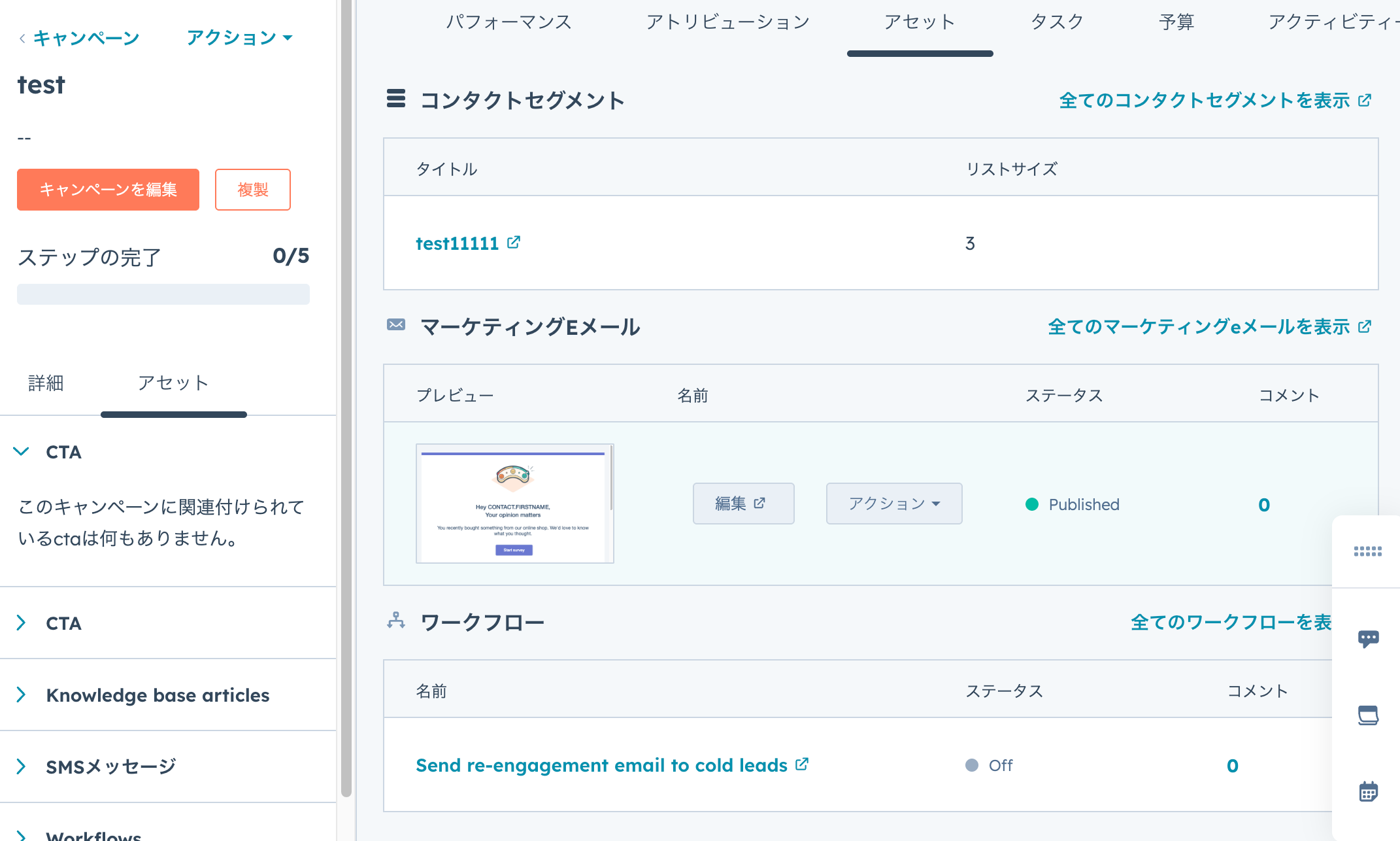
HubSpot Campaigns allow you to centrally integrate and manage a wide variety of marketing assets and content. This enables a comprehensive understanding of how each asset contributes to achieving campaign goals. Specifically, the main elements that can be integrated into a campaign are as follows:
- Blog Posts: Blog content contributing to information dissemination and lead generation related to the campaign.
- Social Media Posts: Content for campaign announcements and engagement promotion on platforms like Facebook, X (formerly Twitter), and LinkedIn.
- Ad Campaigns: Specific campaign ads run on external advertising platforms like Google Ads, Facebook Ads, and LinkedIn Ads.
- CTAs (Calls to Action): Buttons or links placed on websites or emails to encourage specific actions (requesting materials, booking demos, etc.).
- Emails: Direct communication means to prospects and customers, such as nurturing emails, promotional emails, and newsletters.
- Web Pages (including Landing Pages): Website pages or landing pages created specifically for the campaign, intended for lead acquisition or information provision.
- Workflows: Automation processes for a series of actions (sending emails, updating properties, etc.) executed automatically based on specific conditions.
- Forms: Input forms used for collecting lead information or event registration.
By managing these contents collectively within HubSpot's campaign function and operating them while they are mutually associated, you can grasp the full picture of marketing initiatives and realize efficient execution and analysis. For example, in a campaign to promote webinar registration, you can organize everything—social posts for announcements, landing pages providing details, registration forms, reminder emails, and post-participation nurturing workflows—as a single campaign and track their performance collectively.
Extensive Benefits of HubSpot Campaign Strategy
By effectively utilizing HubSpot's campaign function, marketing activities can enjoy significant benefits in various aspects. It goes beyond merely improving work efficiency; it improves the quality of the entire marketing strategy and contributes significantly to achieving final business goals. Let's look at the major effects obtained by introducing HubSpot in detail.
Improved Consistency and Accuracy in Marketing and Sales Strategies
One of the most important benefits of introducing HubSpot to centrally create, manage, and analyze campaigns is bringing consistency to the strategies of various departments such as marketing, sales, and customer success. By consolidating campaigns onto a single platform, it becomes easier for all departments to share common goals and messages. If there is no contradiction in the information provided, the probability of a customer moving from product recognition to purchase increases.
For example, suppose there is a product emphasizing the value of "sustainability" in ads and social media. If a customer considering the product based on this message is suddenly provided with information emphasizing "low price," they might feel "this is not what I am looking for" and drop off.
Thus, proposing a consistent value regardless of the stage the customer is in is essential for building trust and maintaining purchasing intent. HubSpot's campaign function facilitates this consistency of information and serves as a foundation for drastically improving the accuracy of marketing and sales.
Operational Efficiency by Reducing Tool Switching
HubSpot is characterized by comprehensively providing the diverse tools required at each stage of the customer's buying process. By introducing HubSpot's campaign function, you can consolidate the various tools and content used in a campaign onto a single platform, saving the trouble of switching tools.
This frees marketing managers from traditionally laborious tasks, allowing them to realize a significant improvement in operational efficiency. For instance, there is no need to open a separate calendar application to adjust campaign schedules or search through multiple spreadsheets and folders to manage tasks.
Since all relevant information and tools are accessible within the HubSpot dashboard, information fragmentation is resolved, work interruptions are reduced, and you can concentrate on more strategic work. This leads not only to savings in time and effort but also to a reduction in human error, contributing to an improvement in overall productivity.
Campaign Improvement via Effectiveness Measurement and Analysis
HubSpot's campaign reporting function is a powerful tool for clearly grasping the effects and areas for improvement of each executed strategy. To continuously improve campaign accuracy, a cycle of measuring the effects of executed strategies and providing appropriate feedback based on the results is essential.
Using HubSpot allows you to aggregate all data related to a campaign in one place, significantly reducing the effort required for data collection. This frees marketing managers from data gathering tasks, allowing them to spend more time on checking effects and detailed analysis.
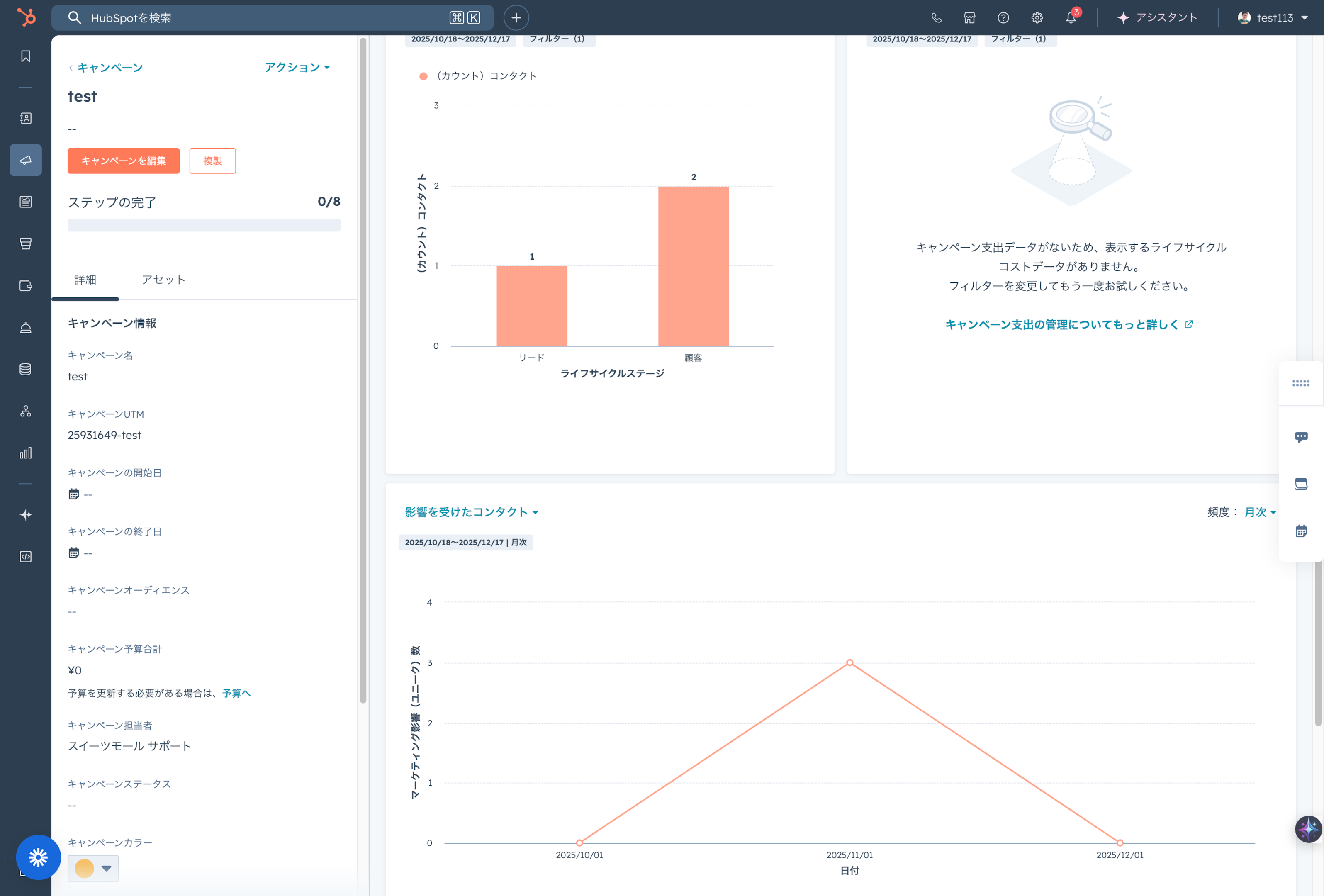
Specific analysis data includes the number of contacts who engaged with assets, session counts, new contacts (first touch/last touch), and revenue generated by the campaign. By proceeding with improvements to each strategy based on this data, campaign accuracy will continuously improve, aiming for higher results.
Strengthening Team Collaboration and Preventing Errors
The introduction of HubSpot Campaigns significantly improves collaboration between departments such as marketing, sales, and customer support. By managing campaigns centrally, each person in charge holds a common understanding, reducing discrepancies in the perception of campaign purposes, goals, messages, and progress. Since role division becomes clear, information such as "who is in charge of which content" and "which content is used in which initiative" can be easily grasped. This transparency reduces lack of communication and promotes smooth cooperation across the entire team.
Also, since related content and ads can be managed together, human errors such as "setting omissions" or "forgetting to distribute" can be suppressed. Being able to list all assets related to a campaign prevents overlooking small tasks and supports the execution of initiatives as planned.
Building an Environment that Smooths the PDCA Cycle
To make marketing initiatives successful, it is important to execute the PDCA cycle (Plan, Do, Check, Act) quickly and continuously. HubSpot's campaign function provides an environment where this PDCA cycle can be executed smoothly. You can set goals in the planning stage, deploy content using HubSpot's various tools in the execution stage, and intensively measure and analyze the results for each campaign.
For example, you can centrally grasp detailed data such as which email was clicked the most, which ad acquired the most new leads, and which landing page achieved the highest conversion rate. This allows for objective evaluation of results and easy identification of areas for improvement or success factors. Based on insights gained from analysis, the process of formulating improvement measures for the next initiative and connecting them to re-execution becomes smooth, enabling the continuous realization of more effective marketing activities.
Key Functions of HubSpot Campaigns and Analyzable Data
HubSpot's campaign tool does more than just group multiple assets; it provides a wide range of functions necessary for campaign success. Central to this are three elements: centralized management of related assets, detailed reporting and analysis, and outcome tracking via goal setting. By coordinating these functions, marketing managers can grasp the entire picture of the campaign and make strategic decisions based on data.
Centralized Management of Related Assets
The foundation of the HubSpot campaign function is the ability to centrally manage related assets (marketing content and tools). When creating a campaign, you can associate all content useful for achieving campaign goals, such as blog posts, social media posts, emails, landing pages, ads, CTAs, forms, and workflows. This centralized management allows for a comprehensive understanding of how each asset contributes to the overall campaign.
For example, in a new product launch campaign, various assets work in coordination: a product landing page, social media posts announcing the launch, emails providing details, CTAs encouraging purchase, and forms receiving customer inquiries. HubSpot's campaign function organizes these assets on a single dashboard and tracks their performance collectively.
Campaign Reports and Detailed Analysis Data
HubSpot is equipped with excellent analysis functions that automatically create detailed reports for each campaign. This allows marketers to clearly grasp "which campaign is most effective" and "which initiative was particularly effective." Since campaign-related data is centrally managed, the hassle of data aggregation is saved, allowing focus on effectiveness verification and deep analysis. This reporting function evaluates campaign results from multiple angles, providing insights essential for future strategy improvement.
Data Items Analyzable in HubSpot Campaigns
In HubSpot campaign reports, you can analyze the extensive data items shown below. By combining these metrics, it is possible to deeply understand the overall effect of the campaign and the contribution of each element.
- Contacts Engaged with Assets: Measures the total number of contacts who reacted to assets (emails, landing pages, etc.) used in the campaign. This helps grasp how much the campaign reached prospects and attracted interest.
- Sessions: Measures the number of sessions to websites related to the campaign (i.e., user visit counts). This indicates how effectively the campaign induced web traffic.
- New Contacts (First Touch): The number of new contacts for whom the campaign was the first point of contact when they were registered in HubSpot. This is an important indicator for evaluating how much the campaign contributed to new lead acquisition.
- New Contacts (Last Touch): The number of new contacts for whom the campaign was the last point of contact immediately before achieving the final goal (e.g., a contract). This indicates the degree to which the campaign directly contributed to conversion.
- Influenced Revenue: The total revenue amount generated by the influence of the campaign. This is one of the most important indicators for measuring the campaign's ROI (Return on Investment) and directly indicates the monetary value marketing activities bring to the business.
- Impressions: The number of times ads or social media posts were displayed. Useful for measuring the effect of awareness campaigns.
- Clicks: The number of times ads or CTAs were clicked. Measures user interest and the effect of encouraging action.
- Influenced Contacts (Contacts with touchpoints before conversion): Indicates the total number of contacts the campaign was involved with in some form during the conversion process. You can grasp not only direct conversions but also indirect contributions.
- Closed Deals: The number of customers who eventually reached a contract through the campaign. This indicates how much marketing activities contributed to sales results.
- ROI by Campaign: An indicator showing how much revenue was obtained against the cost spent on the campaign. It evaluates the investment efficiency of each campaign and helps optimize budget allocation.
These detailed data serve as a solid foundation for deeply understanding every aspect of marketing strategy and executing data-driven improvement measures. By utilizing HubSpot's campaign function, it becomes possible to analyze the data of each content piece and effectively reflect it in marketing strategies.
Concrete Method for Creating HubSpot Campaigns
The process of creating a campaign in HubSpot is intuitive yet possesses the flexibility to set many details necessary for marketing activities. The campaign creation function is available in HubSpot Marketing Hub's Professional or Enterprise plans. Here, we explain the concrete steps from creating a new campaign to goal setting, adding assets, and creating tracking URLs for effectiveness measurement.
How to Launch a New Campaign
Here are the basic steps to start a new campaign in HubSpot. Read through while imagining the steps described below.
- Login to HubSpot and Access Campaign Page: On the HubSpot top page, look for "Marketing" in the top menu and click it. From the displayed menu, select "Campaigns" to move to the campaign management screen.
- Launch New Campaign: Click the "Create campaign" button at the top right of the campaign management screen. If you are creating a campaign for the first time, a guided "Create your first campaign" option may appear. You can use this to proceed with confidence. Experienced users can choose "Skip tour" to proceed directly to the creation screen.
- Input Campaign Information: Enter information regarding the campaign on the displayed screen. This information can be changed later.
- Campaign Name: Enter a specific campaign name. This will appear in reports as well as for internal management.
- Business Unit: If you have multiple business units, select the applicable one. This classifies the campaign as related to a specific business division.
- Campaign Owner: Set the person responsible for the campaign. This clarifies role division within the team.
- Start Date and End Date: Set the campaign period. These dates are reflected in the marketing calendar, aiding in schedule management.
- Campaign Color: Set a color to distinguish it from other campaigns. It facilitates identification on the management screen.
- Goal: Briefly write the main goal of the campaign. Detailed goal setting can be done after creation.
- Audience: Write about the customer segment targeted by the campaign. Important for maintaining message consistency.
- Budget: Set an approximate budget for the campaign. This becomes the basis for cost-effectiveness analysis.
- Notes: Freely write other important information or content you want to share with the team.
- Campaign Creation Complete: Once all information is entered, click the "Create" button. This creates the new HubSpot campaign and moves you to the management screen.
With this procedure, the basic framework of the campaign is completed. Next, you will perform concrete goal setting and linkage with content.
Linking Assets and Content to Campaigns
The core of HubSpot Campaigns is associating and managing various marketing assets and content. This allows you to grasp the results of the entire campaign and accurately measure the contribution of each initiative. There are two ways to add assets: using existing content and creating new content.
Linking Existing Assets
The procedure for associating already created blog posts, emails, landing pages, etc., in HubSpot with a campaign is as follows:
- Go to the campaign details screen and click the "Edit campaign" button at the top left (or "Add assets" button).
- On the left side of the displayed screen, select the type of asset you want to associate (Blog posts, Emails, etc.).
- A list of selected assets will be displayed, so select the ones you want to associate with the campaign.
- After selection, click the "Save" button to confirm.
This manages the selected assets as part of the campaign, and performance data is integrated into the campaign report.
Important Considerations in Asset Linkage
To accurately grasp campaign effects and perform appropriate analysis, thorough asset linkage is essential. Please pay particular attention to the following points:
- Prevention of Linkage Omissions: Be sure to link assets such as emails, landing pages, and blog posts to the relevant campaign. If linkage is neglected, traffic and conversions generated from those assets will not be reflected in the campaign report, potentially causing the overall evaluation of the campaign to be inaccurate. Make it a habit to link to a campaign when creating new content.
- Association to a Single Campaign: In HubSpot, as a general rule, marketing assets (emails, landing pages, blog posts, etc.) can only be associated with one campaign at a time. If you add an asset linked to another campaign to a new campaign, the association with the original campaign is removed, and it is linked to the new one. Carefully consider which asset should be associated with which campaign.
- Association to Multiple Campaigns: As an exception, Workflows and Lists can be associated with multiple campaigns. This corresponds to cases where specific contact lists or automation processes are used in multiple different campaigns.
- Static Lists Only: Lists that can be linked in CRM are static lists only, not dynamic lists.
Keep the above points in mind and aim for effective campaign operation based on accurate data. Appropriate asset linkage is the key to maximizing the HubSpot campaign function and improving marketing results.
Generating Tracking URLs for Effectiveness Measurement
In HubSpot's campaign function, by generating a tracking URL to embed in external websites, you can accurately grasp how much traffic the campaign has induced to your website. Tracking URLs add special tags called UTM parameters to the end of the URL, allowing analysis tools like Google Analytics (and HubSpot) to identify the traffic source, campaign, and type in detail.
The procedure for creating a tracking URL is as follows:
- Access the campaign details screen and click the "Actions" button at the top right.
- Select "Create tracking URL" from the displayed menu.
- In the displayed window, set the following UTM parameters:
- UTM Campaign (utm_campaign): The most important parameter; the name of the HubSpot campaign being created is automatically entered. Used to identify traffic caused by the campaign.
- UTM Source (utm_source): Specifies the source of the traffic, i.e., where the visitor came from (e.g., google, facebook, newsletter).
- UTM Medium (utm_medium): Specifies the type of marketing channel (e.g., cpc, email, social). Optional.
- UTM Term (utm_term): Specified when tracking specific keywords in paid search campaigns. Optional.
- UTM Content (utm_content): Specified when identifying different elements within the same ad (e.g., A/B testing of banner ads). Optional.
- After setting the necessary UTM parameters, click the "Create" button.
The created tracking URL can be used in social media posts, email links, external blog posts, offline promotions, and anywhere else intended to drive traffic to the website. This allows for accurate understanding of which campaign traffic from each channel contributes to, enabling data-based adjustment and optimization of marketing strategies.
Efficient Management of HubSpot Campaigns
When marketing activities become active and numerous campaigns are executed in HubSpot, managing individual campaigns can become cumbersome. Needs arise such as the trouble of finding campaigns one is involved in or wanting to analyze past campaigns matching specific conditions.
HubSpot provides campaign management functions to streamline operations even in such situations. By utilizing these functions, you can smoothly organize campaigns, reuse them, and delete unnecessary ones.
Campaign Segmentation
The "Segmentation" function, which groups campaigns by specific conditions, is very useful for efficiently managing numerous campaigns and quickly accessing necessary information. For example, you can easily filter and display campaigns executed in a specific period, campaigns related to specific products, or campaigns handled by specific teams.
The procedure for segmenting campaigns is as follows:
- On the HubSpot main screen, select "Marketing" > "Campaigns" to move to the campaign dashboard.
- In the "Manage" tab of the campaign list, click the "Add view" button at the top of the table.
- Select "Create new view" from the pulldown menu.
- In the displayed dialog box, enter the name of the new view (e.g., "H1 2024 Campaigns," "Customer Engagement Campaigns") and the conditions for campaigns to include in the view (e.g., campaign type, end date, region) as required items.
- When condition setting is finished, click "Save."
Now, the created custom view is displayed on the campaign dashboard, and you can display only the relevant campaigns just by clicking. This function dramatically improves the efficiency of campaign management, especially for large organizations or companies handling numerous projects.
Campaign Cloning Function and Considerations
When you want to reuse the structure and settings of a previously executed campaign to quickly create a new campaign, the "Clone campaign" function is convenient. This saves the trouble of setting up from zero and significantly shortens the time until the campaign starts.
The procedure to clone a campaign is as follows:
- On the HubSpot campaign dashboard, hover the cursor over the campaign you want to clone.
- Click the "Clone" icon (usually an icon of two overlapping squares) that appears next to the campaign name.
- In the panel displayed on the right side of the screen, enter necessary information such as the new campaign name and start date. Since existing campaign information is pre-entered, modify only the parts that need changing.
- When input is complete, click "Save."
[Note] When using the campaign cloning function, please keep the following points in mind. The cloned campaign automatically inherits many assets (emails, landing pages, blog posts, etc.) associated with the original campaign. However, social media posts and tracking URLs are not copied. Since these assets are often associated with specific publication dates and times or URLs, they need to be created and set again for the new campaign. After cloning, be sure to confirm that these assets are appropriately set according to the purpose of the new campaign.
Deleting Unnecessary Campaigns
You can organize the campaign dashboard and improve visibility by deleting campaigns that are no longer needed, such as finished campaigns or mistakenly created ones. Please operate carefully so as not to accidentally delete important campaigns.
The procedure to delete a campaign is as follows:
- On the HubSpot campaign dashboard, hover the cursor over the campaign you want to delete.
- Click the "Actions" button (usually an icon of three vertical dots) displayed next to the campaign name.
- Select "Delete" from the dropdown menu.
- A message to confirm deletion will be displayed in the dialog box. Check the content, and if there is no problem, click the "Delete" button.
Once a campaign is deleted, it becomes invisible from the HubSpot screen. However, the associated assets themselves are not deleted; only the association with the campaign is removed. Before executing deletion, it is important to fully confirm whether the campaign is truly unnecessary and if there is no impact on related data or reports.
Analysis and Improvement of Results via HubSpot Campaigns
To conduct effective marketing activities, it is essential not only to execute campaigns but also to accurately analyze the results and continuously perform improvements based on data. The HubSpot campaign tool provides powerful analysis functions to grasp campaign performance in detail and support strategic decision-making. Here, we explain how to analyze campaigns in HubSpot and connect them to better results.
Performance Overview Check
To quickly grasp campaign results and evaluate key indicators, checking the overview page of each campaign is most efficient. This page summarizes important information regarding the health and effectiveness of the campaign at a glance.
The procedure to confirm the performance overview is as follows:
- On the HubSpot main screen, select "Marketing" > "Campaigns" to move to the campaign dashboard.
- Click the specific campaign name you want to analyze to open its details screen.
- In the "Performance" tab of the details screen, check the following important indicators:
- Sessions: Indicates the amount of traffic the campaign induced to the website.
- Closed Deals: Indicates how much the campaign advanced prospects into the sales process and contributed to final deals.
- Revenue Attribution: You can confirm the contribution to total revenue generated by the campaign by percentage or amount. This allows evaluation of direct and indirect revenue contributions of each campaign.
- Contact and Session Trend Graphs: In the "Contacts" and "Sessions" sections, the increase/decrease of contact acquisition and session counts during the campaign period is displayed in a time-series graph. This allows visual understanding of which period of the campaign was particularly effective or when results declined.
- Results of Each Asset or Content: Scrolling further down the screen, you can check in detail how much result (impressions, clicks, contacts, etc.) individual blog posts, emails, social media posts, ads, etc., associated with the campaign generated.
By regularly checking this overview page, you can monitor the degree of campaign goal achievement, identify problems early, and obtain valuable insights for adjusting strategies as needed. This allows clear visualization of "which campaign is most effective" and helps in optimizing resource allocation.
Comparing Individual Campaign Results
When executing multiple campaigns in HubSpot, comparing the results of individual campaigns is important to understand which campaign is achieving the most results. By conducting this comparative analysis, you can discover success factors and areas for improvement and utilize them in future campaign strategies.
The method to compare individual campaign results is as follows:
- On the HubSpot campaign dashboard, click the "Compare campaigns" button. This button is usually located at the top or side of the campaign list.
- When the comparison screen is displayed, select multiple campaigns you want to compare from the dropdown menu. Usually, you can compare up to about 5 campaigns simultaneously.
- If you want to increase the number of campaigns to compare, click the "Add campaign" button to select more campaigns.
- After selecting campaigns, set the "Date range" as needed. This allows comparing campaign effects in a specific period, enabling analysis such as "comparing the effect of a campaign from the same period last year with this year's campaign."
Using this comparison function, you can check performance indicators (e.g., new lead acquisition count, conversion rate, revenue) of different campaigns side-by-side. This clearly identifies which campaign strategy, target audience, content, or channel was most effective, obtaining concrete knowledge leading to the improvement of future marketing activities.
Advanced Utilization of HubSpot Campaigns: Templates, Tasks, Calendars
The HubSpot campaign function provides advanced tools to support more efficient operation and strategy formulation in addition to basic creation, management, and analysis. Utilizing these allows for smooth progression from the planning stage to execution and progress management, contributing to the productivity improvement of the entire team.
Utilizing Rich Campaign Templates
Even if you want to use HubSpot for marketing but don't know where to start or what content to include in a campaign, utilizing the rich campaign templates provided by HubSpot allows you to proceed with planning and execution smoothly. These templates are designed to achieve specific marketing goals, with necessary assets and recommended procedures built-in. Currently, HubSpot offers 12 types of campaign templates catering to diverse business needs (as of July 2025).
HubSpot Campaign Template Types and Examples
HubSpot campaign templates are designed to support a wide range of marketing goals. Here, we explain the major templates and their specific usage methods.
- Abandoned Cart:
- Purpose: Encourage users who added items to a cart on an EC site but left without purchasing to complete the purchase.
- Content: Send automated reminder emails or run retargeting ads displaying related products to induce purchase completion. Generally, sending messages in stages (e.g., a few hours later, the next day) captures attention and improves conversion rates.
- Email Drip Campaign:
- Purpose: Deepen relationships with prospects and existing customers in stages, leading them to specific actions.
- Content: A series of emails automatically sent based on a schedule triggered by user actions (form submission, webinar attendance). Nurtures relationships by providing useful info, product benefits, and case studies.
- In-Person Event Promotion:
- Purpose: Increase attendees for physical events like exhibitions and seminars.
- Content: Create LPs with event details, use SNS/display ads for reach, and combine with marketing emails to strengthen attraction. Early bird discounts are also effective.
- Internal Newsletter:
- Purpose: Share important info and news with internal teams.
- Content: Deliver company updates, project progress, and employee welfare info via internal email magazines to activate communication and engagement.
- Lead Generation:
- Purpose: Efficiently acquire new prospects (leads).
- Content: Create LPs for ebook downloads or free trials, and drive traffic via blogs, SNS ads, and SEO. Collect lead info by offering valuable content solving target audience issues.
- Loyalty Program:
- Purpose: Enhance brand loyalty of existing customers.
- Content: Emails encouraging registration for benefit programs (points, VIP services), website announcements, and personalized offers to aim for repeat purchases.
- Nurturing:
- Purpose: Maintain interest of acquired leads and heighten purchasing intent.
- Content: Deliver personalized emails, retargeting ads, and relevant content based on past behavior. Supports transition to the purchasing phase by building trust.
- Onboarding and Welcome:
- Purpose: Support new customers in using the product smoothly and give a good first impression.
- Content: Automated welcome emails, tutorial websites, and support messages to help customers understand product value early.
- Online Event Promotion:
- Purpose: Increase attendees for webinars and live streams.
- Content: LPs for registration, SNS announcements, targeted ads, and reminder emails emphasizing event benefits.
- Product Launch:
- Purpose: Effectively announce new products and improve market recognition.
- Content: Dedicated LPs, teaser campaigns via email, SNS posts, press releases, and influencer collaboration to heighten anticipation before launch.
- Product Sale:
- Purpose: Widely announce limited-time sales to promote sales.
- Content: LPs clearly stating sale content, emails with discount codes, SNS countdowns, and retargeting ads emphasizing urgency.
- Re-engagement:
- Purpose: Reactivate leads or customers with low activity.
- Content: Re-approach via personalized automated emails or special offers to draw interest back and return them to the purchasing process.
These templates should be viewed as basic frameworks and optimized according to your specific goals and target audience.
Progress Management with Campaign Tasks
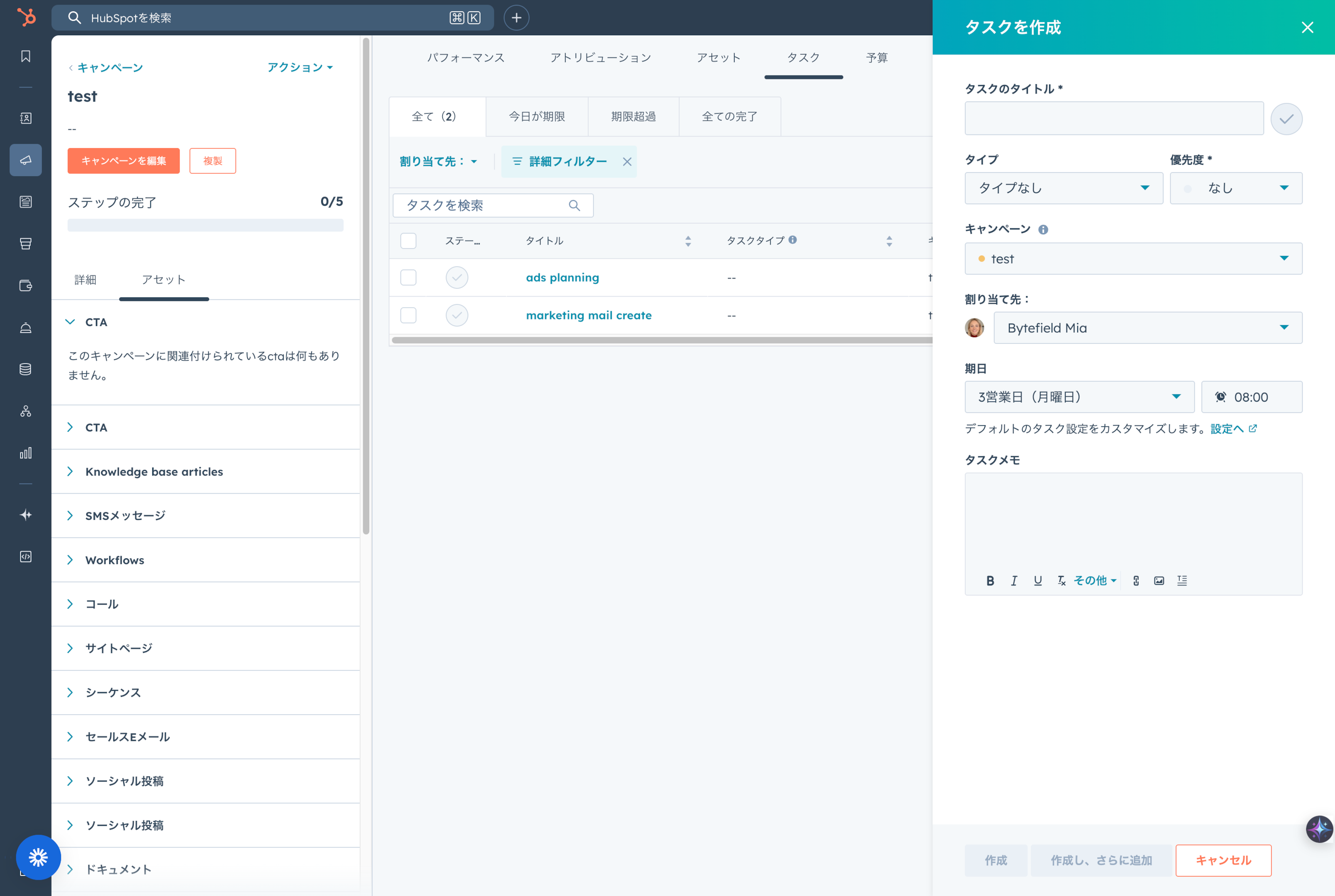
HubSpot's campaign tool includes a "Tasks" function to organize campaign-related tasks and grasp team members' progress.
- Maintaining Organization: Register specific work (e.g., creating blog posts, scheduling SNS, designing ads) as tasks. This divides the campaign into small tasks for reliable execution.
- Grasping Progress: Assign tasks and set deadlines so leaders can check workload and progress, identifying delays early.
- Preventing Omissions: Prevents overlooking important work, ensuring the campaign proceeds as planned.
- Promoting Communication: Use comment functions on tasks for information sharing within HubSpot, saving tool switching.
Grasping the Big Picture with Campaign Calendar
The "Campaign Calendar" allows visual confirmation of schedules.
- Content Planning: Execute plans for blog publishing, email sending, etc., using the calendar. Drag & drop allows for easy adjustment.
- Event Coordination: Manage seasonal events (e.g., holiday campaigns) centrally to deploy effective measures at the optimal timing.
- Resource Optimization: Visually check resource allocation and overlaps when multiple campaigns run simultaneously.
- Information Sharing: Share campaign execution info with stakeholders (sales, management) in an easy-to-understand visual format.
Important Considerations in Using HubSpot Campaigns
To maximize the HubSpot campaign function, you must understand several important precautions.
Thorough Asset Association
Accuracy of effectiveness measurement depends heavily on whether all assets are properly associated.
- Realize Accurate Measurement: Always link assets like emails and LPs to the campaign. Omissions lead to under-evaluation of campaign effects.
- New Content: Use the "Associate with campaign" option when creating new content.
- Existing Assets: Remember the rule: one asset, one campaign (mostly). Adding an asset to a new campaign removes it from the old one. Workflows and lists are exceptions.
Setting Specific and Measurable Goals
Define specific, measurable goals (KPIs) before starting.
- Clarify Goals: Set specific numbers like "Acquire 500 new leads" rather than abstract goals like "Increase leads."
- Ensure Measurability: Ensure goals are based on metrics trackable in HubSpot (Sessions, Contacts, Revenue Attribution).
- Strategic Alignment: Prepare assets (LPs, CTAs) designed to contribute directly to the goal.
HubSpot Marketing Hub Plan Conditions
Campaign functions are limited to specific plans.
- Applicable Plans: Available in Marketing Hub Professional or Enterprise. Not available in Starter or Free plans.
- Feature Limitations: Lower plans cannot use the centralized "Campaign" management and reporting features, even if they can create individual assets.
- Check Before Intro: Confirm your plan and consider upgrading if necessary.
Summary
HubSpot's campaign function is an essential tool for centrally managing and analyzing measures across multiple channels in modern digital marketing to maximize results. Through this article, you should now understand the wide-ranging benefits, from basic definitions to consistency in marketing/sales, efficiency, data-driven improvement, team collaboration, and speeding up the PDCA cycle.
For companies already using HubSpot and those considering it, this function is a powerful tool that "visualizes" marketing activities and enables strategic operation based on data. Maximize the use of HubSpot Campaigns to connect to new customer acquisition, sales expansion, and sustainable business growth.
Frequently Asked Questions
What does a HubSpot Campaign mean?A campaign in HubSpot refers to a series of marketing activities executed significantly and strategically to achieve a specific marketing goal. It is a function to aggregate, manage, and analyze various marketing resources and tools—such as blog posts, SNS posts, ads, emails, landing pages, and automated workflows—within HubSpot. It is used to integrally operate multiple channels toward clear goals like new product announcements or event attraction.
What are the benefits of using HubSpot Campaigns?There are many benefits. First, collaboration between departments like marketing, sales, and customer service is strengthened, providing a consistent customer experience. Also, since there is no need to switch between multiple tools, operational efficiency improves, and human errors decrease. Furthermore, by collectively measuring the results of each measure and performing detailed analysis, it is possible to implement improvement measures based on data and quickly spin the PDCA cycle.
What content and tools can be associated with a campaign?A very wide range of marketing assets can be associated. Specifically: blog posts, social media posts, ad campaigns (Google Ads, Facebook Ads, etc.), CTAs, marketing emails, web pages (including LPs), forms, and workflows. Linking these allows for comprehensive management and analysis of performance.
Please tell me the steps to create a campaign in HubSpot.Log in to HubSpot, select "Marketing" > "Campaigns," and click "Create campaign" at the top right. Enter details like name, owner, period, goal, audience, and budget. After creation, set specific goals via "Edit goals," add assets via "Add assets," and finally generate a tracking URL for effectiveness measurement.
How can I analyze campaign results?HubSpot provides diverse reporting functions. The "Performance" section of each campaign dashboard shows sessions, conversion counts, revenue contribution, new customers (first/last touch), and individual content results. You can visually check trends with graphs and use the "Compare campaigns" function to compare metrics across multiple campaigns to identify the most effective ones.
What types of campaign templates are available?HubSpot offers various templates to support efficient creation (as of July 2025). Specifically, there are 12 types responding to various goals, such as Abandoned Cart, Email Drip, In-Person Event Promotion, Lead Generation, Nurturing, Product Launch, Product Sale, and Re-engagement. These have optimal content and procedures pre-set, reducing construction time.